Managing Files and Folders
Housekeeping of files in the instance can be an unwieldy task. I’ve a couple of scripts to identify a list of files and another to delete files. Moving files produced into a default folder to the desired directory, I use a Pipeline process where the target folder can be changed from default. Finally some scripts can export to any folder, you just need to specify where.
These are EpmAutomate Groovy scripts to run on the server, to get around not having a client side installation.
ListFiles Folders
The EpmAutomate listfiles produces an output of all folders and subfolders under the Planning inbox/outbox /u03/lcm/
Folders Include:
apr/2026-10-18 23_52_44
apr/Feedback 2026-10-18 23_47_09
data
data/snapshots/data
and all the files under the Data Exchange Root Folder: /u03/inbox
Default Folders Include:
inbox
outbox
List Files Script
To create a file of all the visible files in the SaaS EPM environment, run the below script. It will output to a file listfiles.txt in the inbox/outbox folder.
/* RTPS: {gRTP_Input_Password} */

//Encrypt the password of a Service Administrator in the source environment

String PlainTextPWD = rtps.gRTP_Input_Password.toString()
EpmAutomate automate = getEpmAutomate()
EpmAutomateStatus encryptstatus1 = automate.execute('encrypt',PlainTextPWD,'EncryptKey','AdminUserID.epw')
if(encryptstatus1.getStatus() != 0) throwVetoException(encryptstatus1.getOutput())
println(encryptstatus1.getOutput())

/*********************************************************************************************************/

// creates EPMAutomate session on SAS Instance - similar to EPMAutomate batch session on a server

EpmAutomateStatus loginteststatus = automate.execute('login', 'adminuser','AdminUserID.epw' , 'https://epm-test-domain.epm.uk-london-1.ocs.oraclecloud.com')

println(loginteststatus.getOutput())

EpmAutomateStatus runStatus = automate.execute('listfiles')

println(runStatus.getOutput())

Writer exportData = createFileWriter("listfiles.txt")

// Output to file and Job Console
try {
  for(e in runStatus.getItemsList()){
//    println e
    exportData.write (e.toString() + "\n")
    }
  }
  catch(err){
    println err.message
  }
  finally{
    exportData.close()
  }
Delete Files Script
To delete files from the environment, download and edit the ‘listfiles.txt’ created in the above step to have the file to delete included, upload to the inbox/outbox and run the script below.
/* RTPS: {gRTP_Input_Password} */

//Encrypt the password of a Service Administrator in the source environment

String PlainTextPWD = rtps.gRTP_Input_Password.toString()
EpmAutomate automate = getEpmAutomate()
EpmAutomateStatus encryptstatus1 = automate.execute('encrypt',PlainTextPWD,'EncryptKey','AdminUserID.epw')
if(encryptstatus1.getStatus() != 0) throwVetoException(encryptstatus1.getOutput())
println(encryptstatus1.getOutput())

/*********************************************************************************************************/

// creates EPMAutomate session on SAS Instance - similar to EPMAutomate batch session on a server

EpmAutomateStatus loginteststatus = automate.execute('login', 'adminuser','AdminUserID.epw' , 'https://epm-test-domain.epm.uk-london-1.ocs.oraclecloud.com')

println(loginteststatus.getOutput())

csvIterator('listfiles.txt').withCloseable() { rows ->

    rows.eachWithIndex { row, idx ->
      List<String> fileRecord = row.collect{it.toString().trim() } as List<String>
      String filename=fileRecord[0]
      println "Deleteing $filename"
      EpmAutomateStatus runStatus = automate.execute("deletefile", filename)
      println(runStatus.getOutput())
      }
    }
Moving Files with Pipeline
For a User to access a file from the Admin only “Inbox/Outbox” create a pipeline job to move the file to the Data Exchange File Browser.

In the Pipeline, create a “File Operations” job
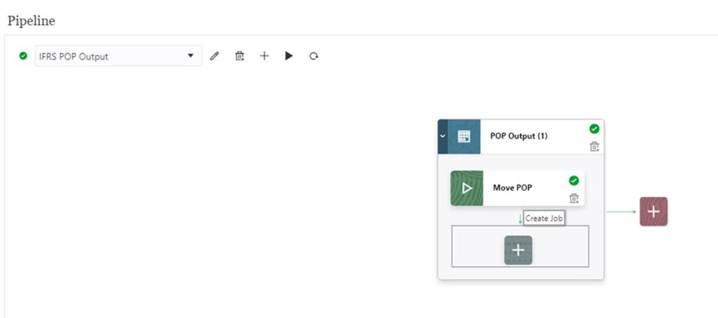
The key here is not to try and enter the file path in the Target Directory drop down, the file name should be prefixed with the folder created by the Data Exchange Location in the “Target File Name”.
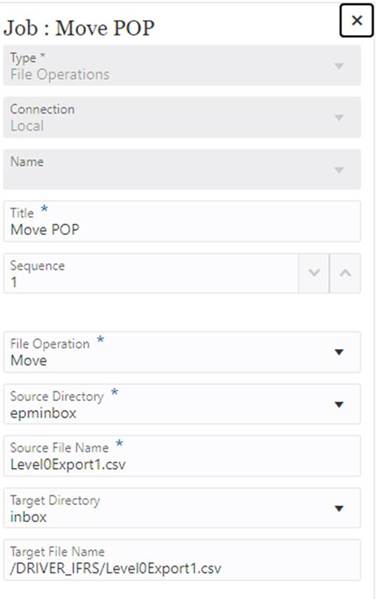
Make sure the forward slash “/” is used, otherwise you end up with a long filename that looks like directory path in the inbox.
Source Directory epminbox is the inbox/outbox explorer. The Target Directory is the Data Exchange inbox.
Then finally run the pipeline to move the file into the accessible folder.
Export to Folder
The default folders inside the SaaS EPM environment are:-
- Data Exchange Root Folder: /u03/inbox
- Planning inbox/outbox Folder: /u03/lcm
And can be added to a calculation script data export like this
Fix(“AC53007″,”AC51004”, @RELATIVE(“Period”,0))
DATAEXPORT “File” ” ” “/u03/lcm/Bonus.txt” “#Mi”; /* space delimiter */
ENDFIX
This can be run to “/u03/inbox/inbox/export.txt”
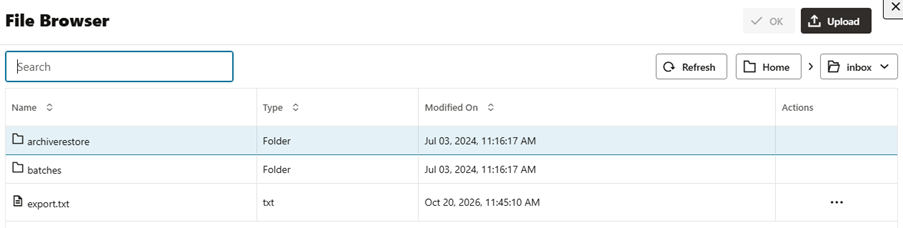
Omitting the path, the file will be created but is lost to an inaccessible folder.
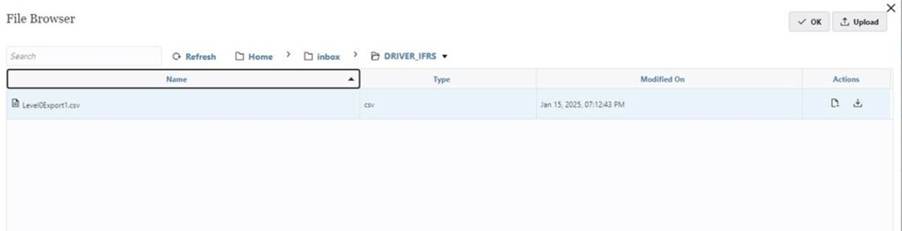
Default Data Export
As a final note, the default level 0 export also uses this folder /u03/lcm
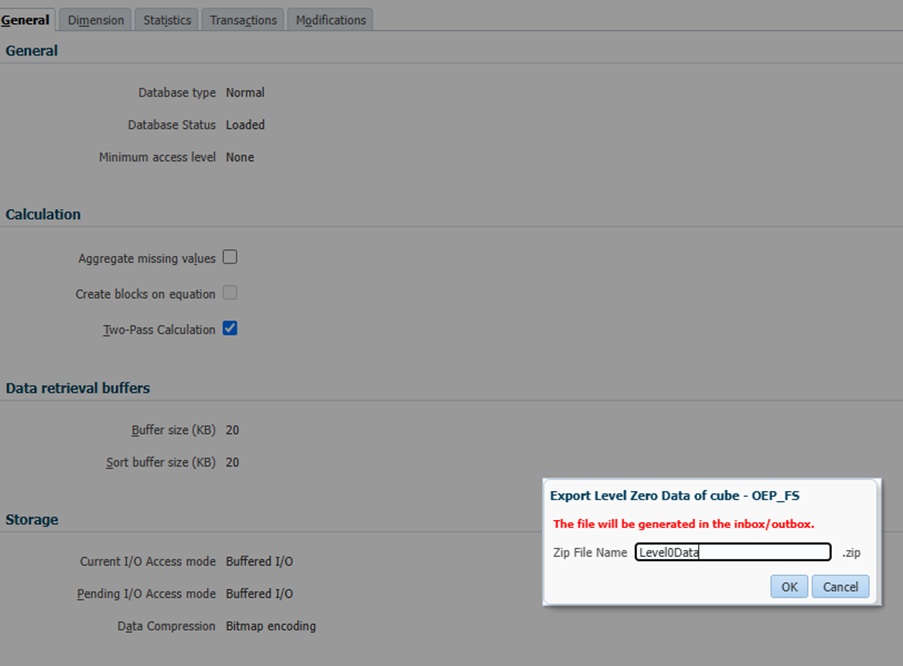
The files can be found in inbox/outbox
