BSO database, calc performance or size management
What to do if the size of your database is getting close to your storage limit, or the performance of a calculation is becoming less optimal because it is running over too many blocks, here is a tip to see where the blocks are in your BSO application.
From the Database Properties the total block count:

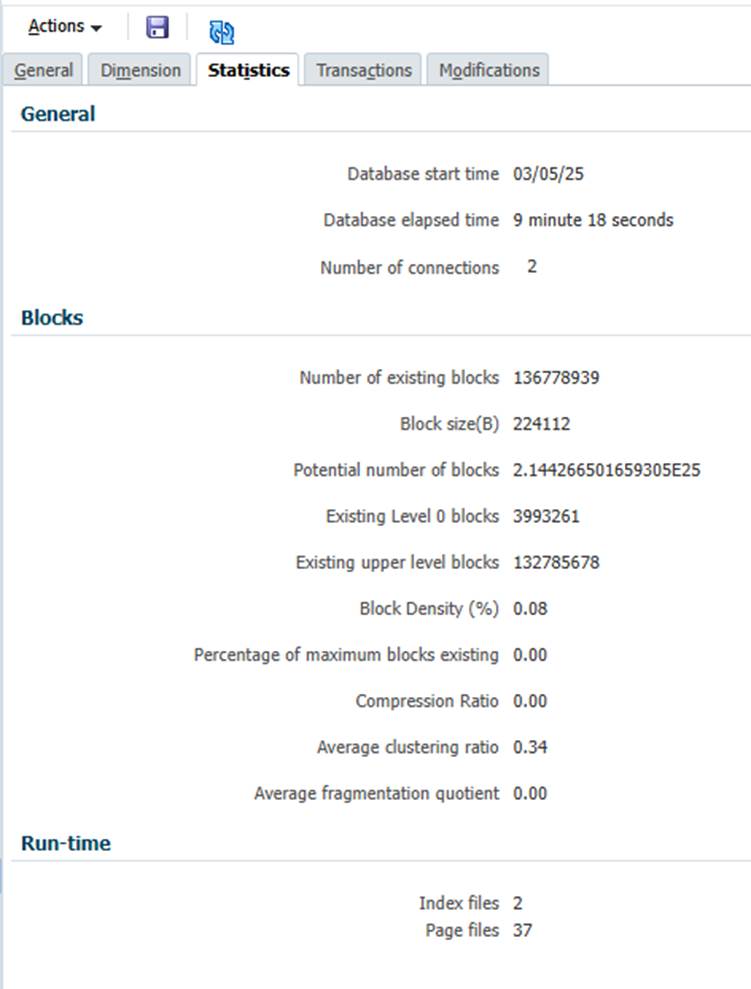
In the Statistics tab I can get the total blocks:
Existing Level 0 blocks 3993261
Existing upper level blocks 132785678
Identifying exactly where all these blocks lie can be a process of elimination, but It can be as simple as the calculation script below where I have just fixed on the scenario dimension and run the script diagnostics. I don’t even have to deploy it, doing the script diagnostics from Calc Manager is all that’s needed. If you change it though you’ll have to save it to take effect.
Fix("Plan")
ENDFIX

Fix("Budget_25")
ENDFIX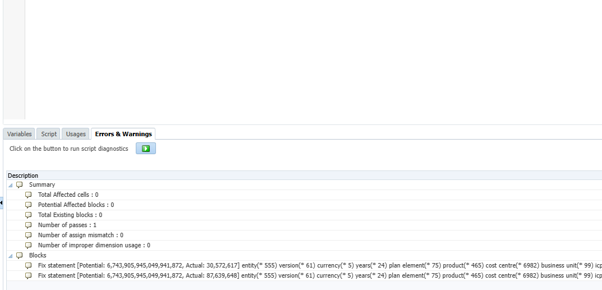
Actual: 30,572,617
Actual: 87,639,648
I can make the FIX statements as focussed as I like. This will help me identify where I want to remove blocks. To see how many upper level blocks there are I can take the difference from the level zero from the total.
/*

Dimension order
Account, Period, Plan Element,  Product, Cost Centre, ICP, Business Unit, Entity, Years, Scenario, Version, Currency, Project

*/

FIX(@Relative("Account",0), @Relative("Period",0), @Relative("Plan Element",0),  @Relative("Product",0), @Relative("Cost Centre",0), @Relative("ICP",0), @Relative("Business Unit",0), @Relative("Entity",0), @Relative("Years",0),
@Relative("Currency",0), @Relative("Project",0))

Fix("Plan")
ENDFIX

Fix("Budget_25")
ENDFIX

ENDFIX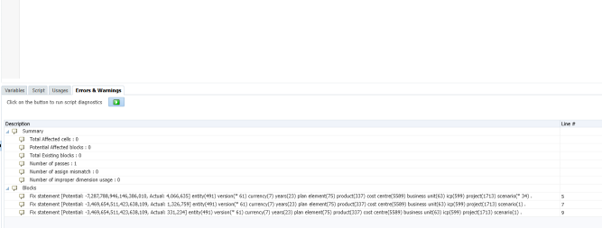
Actual: 1,326,759
Actual: 331,234
| Level 0 | Upper | Total | |
| Total Blocks | 3,993,261 | 132,785,678 | 136,778,939 |
| Plan | 1,326,759 | 29,245,858 | 30,572,617 |
| Budget_25 | 331,234 | 87,308,414 | 87,639,648 |
| Other Scenarios | 2,335,268 | 16,231,406 | 18,566,674 |
From this I can easily see that where there are a lot of upper level blocks to get the best clear.