Copy Version Snapshot in ASO model
Something that comes up regularly is creating a snapshot of Scenario & Version, often a copy of “Budget” “Working” into “Budget” “Final” and locking the data as read only.
Data Copy in BSO
In a BSO or Hybrid model it’s pretty straight forward and you’d do something as simple as this:
FIXPARALLEL(8,@DESCENDANTS("Cost Centre"))
  FIX({RTPTOSCENARIO},{RTPTOVERSION})
    CLEARBLOCK ALL;
  ENDFIX

  DATACOPY {RTPFROMSCENARIO}->{RTPFROMVERSION} TO {RTPTOSCENARIO}->{RTPTOVERSION};
ENDFIXPARALLEL
It’s quick, simple and efficient, even with copying the upper level blocks on my test model it took 1min 30secs. Not much more to say on this really.
Data Copy in ASO
In the past, for an ASO model this would have been neigh on impossible, but now we have some options that we can explore.
- In Groovy
- Data Exporter/Data Import Request
- Flexible Data Grid Export/Grid Builder Import
- Custom Calculation
- Data Manager
- Create an Export file, parse the file to replace values and import
I’m only going to look at the Groovy options as exporting a file feels a bit clunky.
Groovy Options
Data Exporter/Data Import Request
I’ll start with createDataExporter/createDataImportRequest as this was the simplest to code and would work over a large data set. First I wanted to see what data I’d get from the createDataExporter so I set up an export with some row filters to reduce the data set size.
File Output
/****************************************************************************
Name: DataCopy_createDataExporter_fileout
Desc: Copy ASO direct copy between scenario & versions

Author: Nic Vos
Date: 30/1/25

Modifications: Date:Who:What

****************************************************************************/

/*
Dimension order
Account, Period, Balance_Type, Year, Scenario, Version, Currency, View, Department, Purchase_Class, Location, Channel, Item
*/

/* RTPS: {gRTPs_Scenario_Source} {gRTPs_Version_Source} */
// Get the inputs
String sFromScenario = rtps.gRTPs_Scenario_Source.toString().replaceAll('"', '')
String sFromVersion = rtps.gRTPs_Version_Source.toString().replaceAll('"', '')

// Print values from the RowData Object to the JOB console
Closure printOut = {RowData rowData ->
//do some manipulation of the data                                                                    IF v == "#Mi" then "11" ELSE v
      Map<String, String> values = rowData.valuesMap.collectEntries { k, v -> [(k): (v && v == "#Mi" ? "11" : v)] } as Map<String, String>
      println values
      println rowData.getRowDimensions()
      println rowData.getRowMembers()
      println rowData.rowTuple.Period.name + ' '+ rowData.rowTuple.Year.name
      println rowData.getValuesMap()
    [createRowData(rowData.rowTuple, values)]  }

// Alternate just to output non manipulated data
//      [rowData]}
Cube cube = operation.application.getCube('Report')

// Main Export
cube.createDataExporter()
  .setDataExportFormat(CELL_FORMAT)
  .setRowFilterCriteria(sFromVersion, sFromScenario,'ITEM_76914','LOC_29','Live','CLASS_555','DEPT_15','FCGBP','Base','Movement', 'FY20', 'TP1')
  .exportDataToFile("Level0Data.csv", printOut)
n.b. Using a filter of account members “setRowFilterCriteria” results in an empty set being returned and the script exits with a success code.
Using the “CELL_FORMAT” I get a single data column
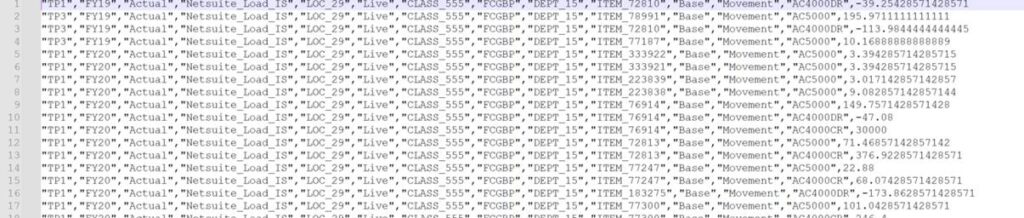
If I comment out the “CELL_FORMAT” across the columns are the Compression dimension: Accounts

Just to see how it worked, I added this line and changed the output #Mi to 11
Map<String, String> values = rowData.valuesMap.collectEntries { k, v -> [(k): (v && v == “#Mi” ? “11” : v)] } as Map<String, String>

Properties Output
Then I wanted to see the properties of the RowData Object and the Tuple Object so I updated the filters to output 1 cell. Given that the accounts are in the columns as the compression dimension, I added “setColumnMemberNames” to filter accounts.

/****************************************************************************
Name: DataCopy_createDataExporter_fileout
Desc: Copy ASO direct copy between scenario & versions

Author: Nic Vos

Date: 30/1/25
Modifications: Date:Who:What

****************************************************************************/

/*
BSO Dimension order
Account, Period, Balance_Type, Year, Scenario, Version, Currency, View, Department, Purchase_Class, Location, Channel, Item

ASO API output order
Period,Year,Scenario,Version,Location,Purchase_Class,Channel,Currency,Department,Item,View,Balance_Type,Account
Made no different to performance of double record
*/

/* RTPS: {gRTPs_Scenario_Source} {gRTPs_Version_Source} */
// Get the inputs
String sFromScenario = rtps.gRTPs_Scenario_Source.toString().replaceAll('"', '')
String sFromVersion = rtps.gRTPs_Version_Source.toString().replaceAll('"', '')

/*
Subroutine to Print values from the RowData Object to the JOB console
*/

Closure printOut = {
RowData rowData ->
  println "\nROWDATA PROPERTIES\n"
  Map<String, String> rowProps = rowData.getProperties() as Map<String, String>
// Print every property and corresponding property value
  for ( entry in rowProps ) {
    println "$entry"
  }
  println "TUPLE PROPERTIES\n"
  Map<String, String> tupleProps = rowData.rowTuple.getProperties() as Map<String, String>

// Print every property and corresponding property value
  for ( entry in tupleProps ) {
    println "$entry"
  }
  println "\nOTHER PROPERTIES\n"

//do some manipulation of the data                                                     IF v == "#Mi" then "11" ELSE v
  Map<String, String> values = rowData.valuesMap.collectEntries { k, v -> [(k): (v && v == "#Mi" ? "11" : v)] } as Map<String, String>

//output some values
  println "Row Values:" + values
  println "Row Dimensions:" + rowData.getRowDimensions()
  println "Row Members:" + rowData.getRowMembers()
  println "Row Tuple (Scenario/Version):" + rowData.rowTuple.Scenario + '/'+ rowData.rowTuple.Version
  println "Row Values Map:" + rowData.getValuesMap()
  [createRowData(rowData.rowTuple, values)]

// Alternate just to output non manipulated data
//  [rowData]
}


// Main Export
Cube cube = operation.application.getCube('Report')
cube.createDataExporter()
  .setColumnDimensionName("Account")
  .setColumnMemberNames(["AC4000CR"]) // filter on accounts dimension
  .setDataExportFormat(COLUMN_FORMAT)
  .setRowFilterCriteria(sFromVersion, sFromScenario,'ITEM_76914','LOC_29','Live','CLASS_555','DEPT_15','FCGBP','Base','Movement', 'FY20', 'TP1')
  .exportDataToFile("Level0Data.csv", printOut)
Here are the properties output:
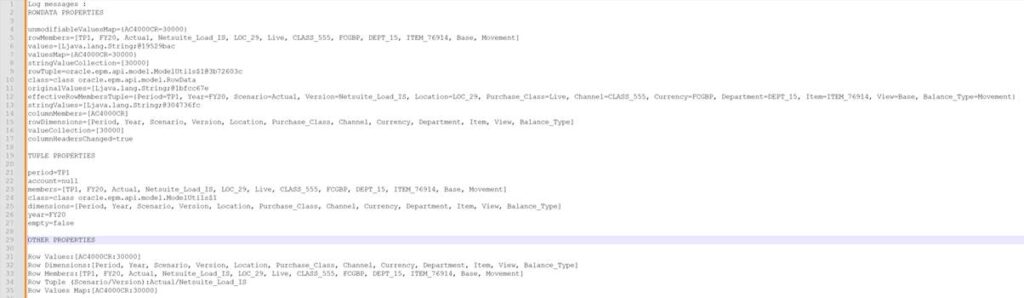
The ones I’m interested in changing for the target of the copy is the Tuple for Scenario and Version.
Copy Script
As an aside, CELL_FORMAT or COLUMN_FORMAT, either way it made no difference to the execution time of the data copy, on my test model it took 6 mins to copy a full Scenario/Version pair for all other members using the script below:
/****************************************************************************
Name: DataCopy_createDataExporter
Desc: Copy ASO direct copy between scenario & versions

Author: Nic Vos

Date:
Modifications: Date:Who:What

****************************************************************************/

/*
Dimension order
Account, Period, Balance_Type, Year, Scenario, Version, Currency, View, epartment, Purchase_Class, Location, Channel, Item
*/

/* RTPS: {gRTPs_Scenario_Source} {gRTPs_Scenario_Target} {gRTPs_Version_Source} {gRTPs_Version_Target} */
// Get the inputs
String sFromScenario = rtps.gRTPs_Scenario_Source.toString().replaceAll('"', '')
String sFromVersion = rtps.gRTPs_Version_Source.toString().replaceAll('"', '')
String sToScenario = rtps.gRTPs_Scenario_Target.toString().replaceAll('"', '')
String sToVersion = rtps.gRTPs_Version_Target.toString().replaceAll('"', '')

Cube cube = operation.application.getCube('Report')

// Claer the target data cohort
cube.clearPartialData("Crossjoin({[$sToScenario]},{[$sToVersion]})",true)

cube.createDataExporter()
  .setDataExportFormat(CELL_FORMAT)
// filter data to the required source cohort
  .setRowFilterCriteria(sFromVersion, sFromScenario)
  .exportData()
// loop through every row output and create an import request with that data row
  .withCloseable { exportIterator ->
    cube.createDataImportRequest()
    .importData([])
// step through, creating rows for the target data cohort
    .withCloseable { dataImporter ->
// loop through the properties of the row data and update the TUPLE with the target Version & Scenario
      exportIterator.each {RowData rowData ->
// update the TUPLE to have the target member names
      Tuple targetMembers = rowData.rowTuple + [Version : sToVersion] + ["Scenario" : sToScenario]
      dataImporter.addRow(createRowData(targetMembers,  rowData.columnMembers, rowData.getValuesMap() ))
      }
    }
  }
Difference in EPCM
I tried the same script in EPCM and got no results. Quite mysterious. After some trial and error I discovered the way to do it in EPCM. In EPBCS we need to replace this line
dataImporter.addRow(createRowData(targetMembers, rowData.columnMembers, rowData.getValuesMap() ))
with this
dataImporter.addRow(targetMembers, rowData.values)
However if I substitute this line into the EPBCS script I get this error
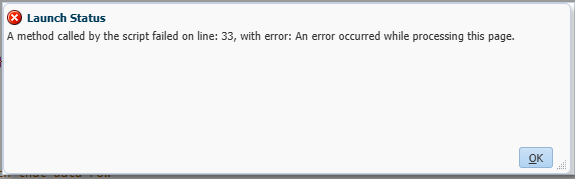
Don’t know why this is the case but the Oracle documentation is how it works in EPBCS.
Oracle example for EPBCS
In the documentation, the example uses the createRowData method
Flexible Data Grid Export/Grid Builder Import
I tried the flexibleDataGridDefinitionBuilder/dataGridBuilder to see if it would work. For a limited data set it was very efficient, this took 2 seconds to run whereas with the dataExporter on the same cohort of data, it took 43 seconds.
/****************************************************************************
Name: DataCopy_FlexibleGridDefinitionBuilder
Desc: output of the flexibleDataGridDefinitionBuilder is input to dataGridBuilder

Author: Nic Vos

Date: 02/04/25

Modifications:
Date:     Who:          What:

****************************************************************************/

/* Dimension Order
Account, Period, Balance_Type, Year, Scenario, Version, Currency, View, epartment, Purchase_Class, Location, Channel, Item
*/

/* RTPS:  */
Cube sourceCube = operation.application.getCube("Report") //set cube
Cube targetCube = operation.application.getCube("Report") //set cube

// By varying the column members will impact the number of rows output with the supress missing as the supress is on rows, so shorter rows will remove more missings
def dataGrid = sourceCube.flexibleDataGridDefinitionBuilder() //set source object

DataGridBuilder builder = targetCube.dataGridBuilder("MM/DD/YYYY") //set target object
dataGrid.setPov("FCGBP", "Actual", "Base", "Movement", "FY20")
dataGrid.addColumn("Netsuite_Load_IS") //set column members
dataGrid.addRow('ILvl0Descendants(TI)','ILvl0Descendants(Channel)','ILvl0Descendants(Location)','ILvl0Descendants("Purchase_Class")','DEPT_15','TP1','AC4000CR') //set row members

//set suppression settings
dataGrid.setSuppressMissingRows(true)
dataGrid.setSuppressMissingBlocks(true)
dataGrid.setSuppressMissingSuppressesZero(true)
builder.addPov("FCGBP", "Actual", "Base", "Movement", "FY20")
builder.addColumn("Flashback")

sourceCube.loadGrid(dataGrid.build(),false).withCloseable { grid ->
  grid.dataCellIterator().each {
    builder.addRow([it.getMemberName("Item"),it.getMemberName("Channel"),it.getMemberName("Location"),it.getMemberName("Purchase_Class"),it.getMemberName("Department"),"TP1","AC4000CR"], [it.formattedValue])
    }
}

// Create a status class to hold the results
DataGridBuilder.Status status = new DataGridBuilder.Status()

// Build the grid – basically a refresh/retrieve
DataGrid grid = builder.build(status)
println("Total number of cells accepted: status.numAcceptedCells")
println("Total number of cells rejected: status.numRejectedCells")
println("First 100 rejected cells: status.cellsRejected")

// Save the data to the cube
targetCube.saveGrid(grid)
After expanding the member selections on the “addRow” with :
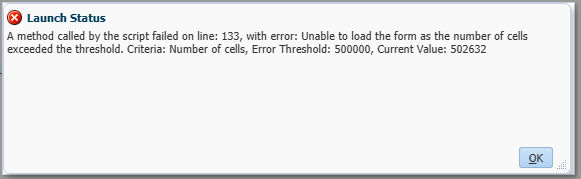
'ILvl0Descendants("Department")','ILvl0Descendants("Period")I had this issue with the grid size.
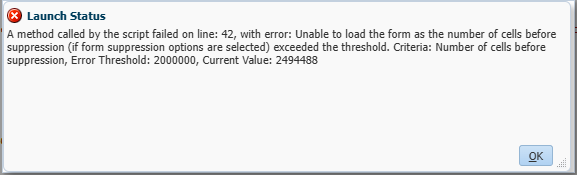
I suppose I could have looped through a list of the periods and accounts, closing the grid each time but with 940 accounts * 20 periods * 2 seconds per grid would be estimated 10 hours run time, I was not optimistic enough to put it to the test. So this definitely has it’s place though for a smaller data copy.
Custom Calculation
On the small cohort of data as used with the previous tests, with a focused clear that matched the target cohort, the executeAsoCustomCalculation took 1 second to run. The best yet. Expanding the cohort with all departments, periods and accounts still only took 8 seconds, so a much bigger data selection than the flexibleDataGridDefinitionBuilder could handle. Adding all the years took the copy up to 3min 50 secs. All currencies took it to 7min 30secs. Expanding the data set to all the level 0 members and the calculation took 13min 40secs.
Making use of the “use_optimized_way” & “NONEMPTYTUPLE” made matters worse on the performance of the calculation.
/****************************************************************************
Name: DataCopy_executeAsoCustomCalculation
Desc: Copy ASO direct copy between scenario & versions

Author: Nic Vos

Date:

Modifications: Date:Who:What

****************************************************************************/
/*
Dimension order
Account, Period, Balance_Type, Year, Scenario, Version, Currency, View, Department, Purchase_Class, Location, Channel, Item
*/

/* RTPS: {gRTPs_Scenario_Source} {gRTPs_Scenario_Target} {gRTPs_Version_Source} {gRTPs_Version_Target} */
// Get the inputs
String sFromScenario = rtps.gRTPs_Scenario_Source.toString().replaceAll('"', '')
String sFromVersion = rtps.gRTPs_Version_Source.toString().replaceAll('"', '')
String sToScenario = rtps.gRTPs_Scenario_Target.toString().replaceAll('"', '')
String sToVersion = rtps.gRTPs_Version_Target.toString().replaceAll('"', '')

CustomCalcParameters parameters0 = new CustomCalcParameters()

//***************** Parameters for most of the model **************
parameters0.pov = "Crossjoin(Crossjoin(Crossjoin(Crossjoin(Crossjoin(Crossjoin(Crossjoin(Crossjoin(Crossjoin(Crossjoin(\
{Filter(Filter([Account].Levels(0).Members,NOT [Account].CurrentMember.Shared_Flag),[Account].CurrentMember.MEMBER_TYPE <> 2)},\
{Filter(Filter([Department].Levels(0).Members,NOT [Department].CurrentMember.Shared_Flag),[Department].CurrentMember.MEMBER_TYPE <> 2)}),\
{Filter(Filter([Purchase_Class].Levels(0).Members,NOT [Purchase_Class].CurrentMember.Shared_Flag),[Purchase_Class].CurrentMember.MEMBER_TYPE <> 2)}),\
{Filter(Filter([Location].Levels(0).Members,NOT [Location].CurrentMember.Shared_Flag),[Location].CurrentMember.MEMBER_TYPE <> 2)}),\
{Filter(Filter([Channel].Levels(0).Members,NOT [Channel].CurrentMember.Shared_Flag),[Channel].CurrentMember.MEMBER_TYPE <> 2)}),\
{Filter(Filter([Item].Levels(0).Members,NOT [Item].CurrentMember.Shared_Flag),[Item].CurrentMember.MEMBER_TYPE <> 2)}),\
{[Year].Levels(0).Members}),\
{[Currency].Levels(0).Members}),\
{[View].Levels(0).Members}),\
{[Balance_Type].Levels(0).Members}),\
{MemberRange([TP1],[TP12])} )"

parameters0.RoundDigits=16
parameters0.target = ""
parameters0.creditMember = ""
parameters0.debitMember = ""
parameters0.offset = ""

// Got to clear the area first. Use multiplication on the existing data, a static assignment will run onto every cell I think!
parameters0.sourceRegion = "Crossjoin({[$sToVersion]},{[$sToScenario]})"
parameters0.script = "([$sToVersion],[$sToScenario]) := ([$sToVersion],[$sToScenario])*0;"

// CLEAR THE TARGET REGION
operation.getApplication().getCube('Report').executeAsoCustomCalculation(parameters0)


// COPY SOURCE DATA TO THE TARGET
//parameters0.script = "use_optimized_way; ([$sToScenario],[$sToVersion]) :=  NONEMPTYTUPLE([$sFromScenario],[$sFromVersion]) ([$sFromScenario],[$sFromVersion]);"
parameters0.sourceRegion = "Crossjoin({[$sFromScenario]},{[$sFromVersion]})"
parameters0.script = "([$sToVersion],[$sToScenario]) := ([$sFromVersion],[$sFromScenario]);"
operation.getApplication().getCube('Report').executeAsoCustomCalculation(parameters0)
n.b. on a larger test environment I did encounter a cell limit issue so this could be a limiting factor and given the complexity of the code, I’d prefer the createDataExporter method.