Update Of Security by File
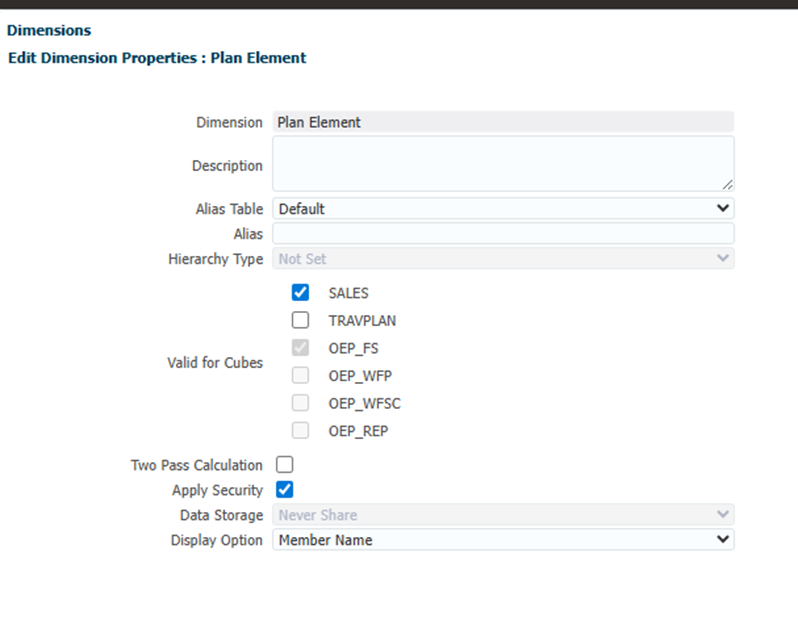
In this blog I wanted to update Planning Security using file imports. When a dimension is security enabled (see below) and required multiple members to have security applied to them, doing it through the user interface is tedious. This is also true of rules and forms.
Import Security Groups
First thing to do is add the users and security groups. The file will need to be in this format: “Group Name”,”Description”
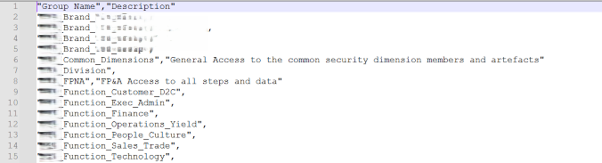
In the Access Control->Manage Groups there is an option to export to file but not import

So here is a script to load the file:
/* RTPS: {gRTP_Input_Password} */

//Encrypt the password of a Service Administrator in the source environment

String PlainTextPWD = rtps.gRTP_Input_Password.toString()

EpmAutomate automate = getEpmAutomate()

EpmAutomateStatus encryptstatus1 = automate.execute('encrypt',PlainTextPWD,'EncryptKey','AdminUserID.epw')

if(encryptstatus1.getStatus() != 0) throwVetoException(encryptstatus1.getOutput())

println(encryptstatus1.getOutput())

/*********************************************************************************************************/

// creates EPMAutomate session on SAS Instance - similar to EPMAutomate batch session on a server

EpmAutomateStatus login12teststatus = automate.execute('login', 'user@impactepm.com','AdminUserID.epw' , 'https://plan-test-Domain.epm.ca-montreal-1.ocs.oraclecloud.com')

EpmAutomateStatus runStatus = automate.execute('createGroups','Groups.csv')


if(runStatus.getStatus() != 0) {
  println("Run Status"+runStatus.getOutput())
}
n.b. It isn’t possible to import groups that inherit security from other groups, this has to be done manually by adding one group as a member of the next group.
I’m going to assume that the users are all set up in the Tenancy so that they appear in the Manage Users. When it comes to assigning users to Groups, and export/import facility exists and no need for scripting.

Export Artefact Security Data
This script will create an export file ACL (Access Control List) in the correct format that can be used as a template for the import or a back up of the security. To create this there must be at lease one item with security applied.
/* RTPS: {gRTP_Input_Password} */

//Encrypt the password of a Service Administrator in the source environment

String PlainTextPWD = rtps.gRTP_Input_Password.toString()

EpmAutomate automate = getEpmAutomate()

EpmAutomateStatus encryptstatus1 = automate.execute('encrypt',PlainTextPWD,'EncryptKey','AdminUserID.epw')

if(encryptstatus1.getStatus() != 0) throwVetoException(encryptstatus1.getOutput())

println(encryptstatus1.getOutput())

/*********************************************************************************************************/

// creates EPMAutomate session on SAS Instance - similar to EPMAutomate batch session on a server

EpmAutomateStatus login12teststatus = automate.execute('login', 'user@impactEPM.com','AdminUserID.epw' , 'https://plan-test-Domain.epm.ca-montreal-1.ocs.oraclecloud.com')

EpmAutomateStatus runStatus = automate.execute('exportAppSecurity','Acl_Security_file.csv')


if(runStatus.getStatus() != 0) {

println("Run Status"+runStatus.getOutput())

}
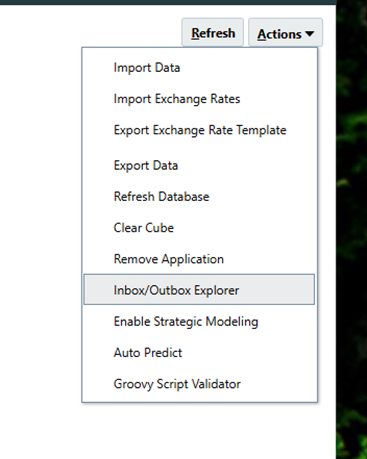
The file will be created in the Inbox/Outbox Explorer.

Below is a sample of an ACL (Access Control List) file format.
| Object Name | Name | Parent | Is User | Object Type | Access Type | Access Mode | Remove |
| a | Brand_A | N | SL_DIMENSION | READWRITE | @IDESCENDANTS | ||
| Group | Brand_Group | N | SL_DIMENSION | READWRITE | @IDESCENDANTS | ||
| Revenue_Intercompany | Common_Dimensions | N | SL_DIMENSION | READWRITE | MEMBER | ||
| Other_Revenue | Common_Dimensions | N | SL_DIMENSION | READWRITE | MEMBER | ||
| Commissions | Common_Dimensions | N | SL_DIMENSION | READWRITE | @IDESCENDANTS | ||
| Forms | Common_Dimensions | / | N | SL_FORMFOLDER | READWRITE | @IDESCENDANTS | |
| Step2 | Step2 | /FPNA | N | SL_CALCFOLDER | LAUNCH | @IDESCENDANTS | |
| STEP5_Adjustment (+/-) | Step5 | N | SL_DIMENSION | READWRITE | MEMBER | ||
| Step5 | Step5 | /FPNA | N | SL_CALCFOLDER | LAUNCH | @IDESCENDANTS |
For full details of field values in object type, access type & access model see: Import Security in Oracle’s documentation.
Import Artefact Security Data
Once the file is updated and uploaded back to the Inbox/Outbox Explorer, this script can be used to import the security.
/* RTPS: {gRTP_Input_Password} */

//Encrypt the password of a Service Administrator in the source environment

String PlainTextPWD = rtps.gRTP_Input_Password.toString()

EpmAutomate automate = getEpmAutomate()

EpmAutomateStatus encryptstatus1 = automate.execute('encrypt',PlainTextPWD,'EncryptKey','AdminUserID.epw')

if(encryptstatus1.getStatus() != 0) throwVetoException(encryptstatus1.getOutput())

println(encryptstatus1.getOutput())

/*********************************************************************************************************/

// creates EPMAutomate session on SAS Instance - similar to EPMAutomate batch session on a server

EpmAutomateStatus login12teststatus = automate.execute('login', 'user@impactepm.com','AdminUserID.epw' , 'https://plan-test-Domain.epm.ca-montreal-1.ocs.oraclecloud.com')

EpmAutomateStatus runStatus = automate.execute('importAppSecurity','Acl_Security_file.csv', 'clearall=true')


if(runStatus.getStatus() != 0) {
println("Run Status"+runStatus.getOutput())
}
When I was testing this in October 2025 the clearall=true didn’t seem to work, so I had to set the remove column to Y to reset the security.