Performance step up for @PRIOR
I had been considering putting pen to paper about the @XRANGE function as it has caused me pain in the past, but while I was perusing LinkedIn I can across this article by Matt Rollings where he talks about an alternative to @PRIOR and @XRANGE to improve performance.
Reporting Raja’s writeup here on @PRIOR
Knowing full well that he was right, I wanted to see what sort of impact it would actually have on my test model and was left wondering why I’d never done this before as I have done something similar with currency calculations. I’ll post about that later.
But before getting into the performance, a recap on the @XRANGE, Raja Stalvin goes into quite some to explain how @XRANGE works in his article. I have a slightly different approach to the use of @XRANGE but the net result is the same.
To summarise the issue Raja explains that @XRANGE includes all the level 0 members e.g. BegBalance and any other periods that may be defined, so each range of periods needs to be done individually for each year.
DO NOT DO THIS
FIX({gRTPs_Scenario}, {gRTPs_Version},"FY19":"FY29",@RELATIVE("YearTotal",0))
"On_Order" = @PRIOR("Quantity_Sold",1,@XRANGE("FY19"->"TP1","FY29"->"TP12"));
ENDFIX
The result will be:
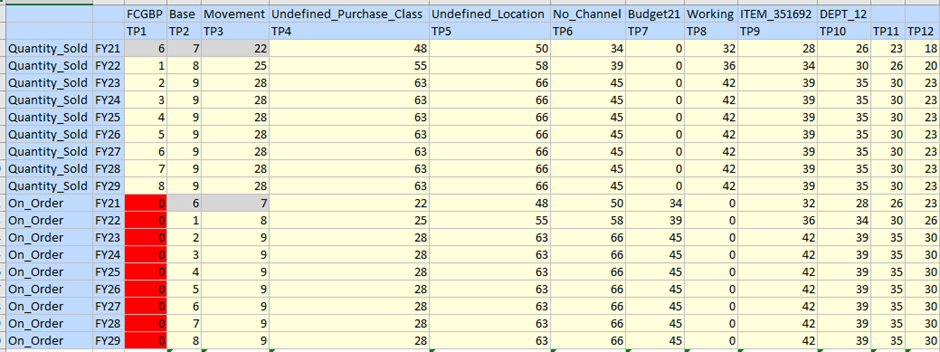
Where TP1 has taken values from BegBalance not TP12.
INSTEAD
FIX({gRTPs_Scenario}, {gRTPs_Version},"FY19":"FY29",@RELATIVE("YearTotal",0))
  "On_Order" = @PRIOR("Quantity_Sold",1,@LIST(
    @XRANGE(@MEMBER(@PREVSIBLING(@CURRMBR("Year")))->"TP1",@MEMBER(@PREVSIBLING(@CURRMBR("Year")))->"TP12")),
    @XRANGE(@CURRMBR("Year")->"TP1",@CURRMBR("Year")->@CURRMBR("Period")));
ENDFIX
And then it’s fine, TP1 is TP12 of the previous year. Note that I restrict the periods and years in the FIX statement so that XRANGE doesn’t return an empty member set.
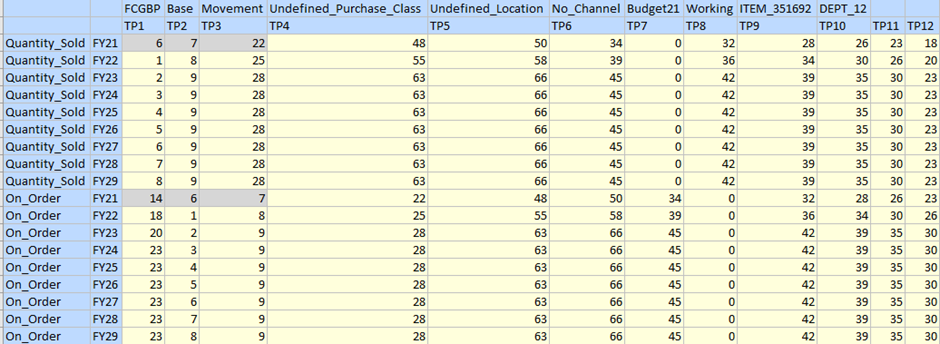
Performance Using xRange
However, Matt’s point was not to use this anyway, so to see how much quicker using cross dimensional references is than using @PRIOR I used the script above to calculate one account over 728k blocks.
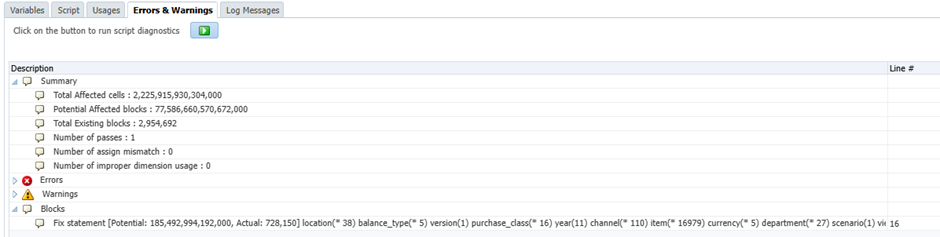
note the message “will be executed in [CELL] mode”
Calculation time 13 seconds
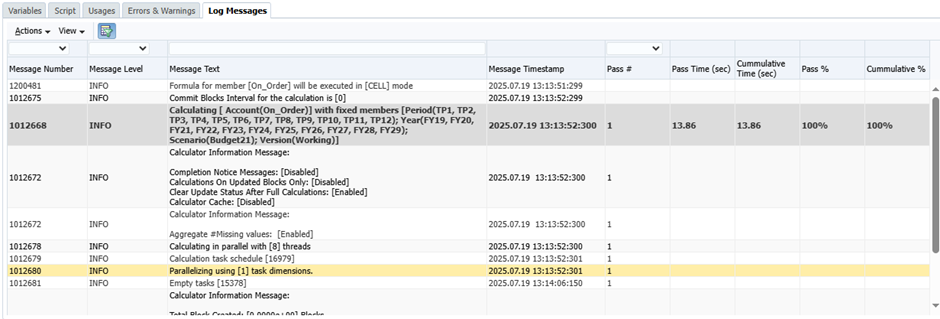
For two accounts 22 seconds by adding:
"On_Order_Adj" = @PRIOR("Quantity_Sold",1,@LIST(
  @XRANGE(@MEMBER(@PREVSIBLING(@CURRMBR("Year")))->"TP1",@MEMBER(@PREVSIBLING(@CURRMBR("Year")))->"TP12")),
  @XRANGE(@CURRMBR("Year")->"TP1",@CURRMBR("Year")->@CURRMBR("Period")));
For Three Accounts 29 seconds by adding this:
"On_Order_Override" = @PRIOR("Quantity_Sold",1,@LIST(
  @XRANGE(@MEMBER(@PREVSIBLING(@CURRMBR("Year")))->"TP1",@MEMBER(@PREVSIBLING(@CURRMBR("Year")))->"TP12")),
  @XRANGE(@CURRMBR("Year")->"TP1",@CURRMBR("Year")->@CURRMBR("Period")));
Using Cross Dimensional Operators
The order of precedence changes when you go to block mode, so some caution is required if the calculation has calculated dependencies. I did this in three stages to see the increment in calculation times, here is the final script I ran using a TEMPLATE
/****************************************************************************
Name: xrange_IF_performance
Desc: test using IF conditions instead of @PRIOR to utilise CALCMODE(BLOCK)

Author: Nic Vos
Date: 15/2/20

Modifications:
Date:Who:What

****************************************************************************/


SET AGGMISSG ON;
SET CALCPARALLEL 8;
SET CALCTASKDIMS 1;
SET EMPTYMEMBERSETS ON;
SET UPDATECALC OFF;

SET HYBRIDBSOINCALCSCRIPT NONE;
SET FRMLBOTTOMUP OFF;


FIX({gRTPs_Scenario}, {gRTPs_Version},"FY19":"FY29",@RELATIVE("YearTotal",0))
 %Template(name:="iEPM_Function_atPRIOR",application:="iEPM",plantype:="Input",dtps:=("Calc_Member":=[["On_Order"]],"Prior_Member":=[["Quantity_Sold"]]))
 %Template(name:="iEPM_Function_atPRIOR",application:="iEPM",plantype:="Input",dtps:=("Calc_Member":=[["On_Order_Adj"]],"Prior_Member":=[["Quantity_Sold"]]))
 %Template(name:="iEPM_Function_atPRIOR",application:="iEPM",plantype:="Input",dtps:=("Calc_Member":=[["On_Order_Override"]],"Prior_Member":=[["Quantity_Sold"]]))

ENDFIX


THE TEMPLATE:

/****************************************************************************
Name: iEPM_Function_atPRIOR
Version: 1.0
Desc: Calculate @PRIOR using redirection formula to keep calc mode block

Author: Nic Vos
Date: 19/7/25

Modifications:
Date:Who:What

****************************************************************************/

[Calc_Member](@CALCMODE(BLOCK);
    IF(@ISMBR("TP1"))
      [Calc_Member] = [Prior_Member]->@MEMBER(@PREVSIBLING(@CURRMBR("Year")))->"TP12";
    ELSEIF(@ISMBR("TP2"))
      [Calc_Member] = [Prior_Member]->"TP1";
    ELSEIF(@ISMBR("TP3"))
      [Calc_Member] = [Prior_Member]->"TP2";
    ELSEIF(@ISMBR("TP4"))
      [Calc_Member] = [Prior_Member]->"TP3";
    ELSEIF(@ISMBR("TP5"))
      [Calc_Member] = [Prior_Member]->"TP4";
    ELSEIF(@ISMBR("TP6"))
      [Calc_Member] = [Prior_Member]->"TP5";
    ELSEIF(@ISMBR("TP7"))
      [Calc_Member] = [Prior_Member]->"TP6";
    ELSEIF(@ISMBR("TP8"))
      [Calc_Member] = [Prior_Member]->"TP7";
    ELSEIF(@ISMBR("TP9"))
      [Calc_Member] = [Prior_Member]->"TP8";
    ELSEIF(@ISMBR("TP10"))
      [Calc_Member] = [Prior_Member]->"TP9";
    ELSEIF(@ISMBR("TP11"))
      [Calc_Member] = [Prior_Member]->"TP10";
    ELSEIF(@ISMBR("TP12"))
      [Calc_Member] = [Prior_Member]->"TP11";
    ENDIF)
Running this across the same blocks also for one account the results are below, note the message “will be executed in [CELL] model” is absent Calculation time 7 seconds
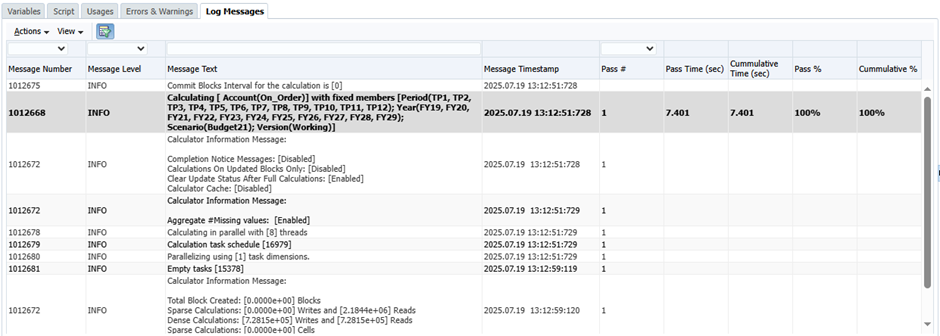
For two accounts 8 seconds
And three accounts 10 seconds
Then I read Matt’s post again and started wondering about the use of @CURRMBR and the other functions, so I gave this a try by hard coding in the years and it saved a couple of seconds
[Calc_Member](@CALCMODE(BLOCK);
    IF(@ISMBR("TP1"))
      IF(@ISMBR("FY19"))
        [Calc_Member] = [Prior_Member]->"FY18"->"TP12";
      ELSEIF(@ISMBR("FY20"))
        [Calc_Member] = [Prior_Member]->"FY19"->"TP12";
      ELSEIF(@ISMBR("FY21"))
        [Calc_Member] = [Prior_Member]->"FY20"->"TP12";
      ELSEIF(@ISMBR("FY22"))
        [Calc_Member] = [Prior_Member]->"FY21"->"TP12";
      ELSEIF(@ISMBR("FY23"))
        [Calc_Member] = [Prior_Member]->"FY22"->"TP12";
      ELSEIF(@ISMBR("FY24"))
        [Calc_Member] = [Prior_Member]->"FY23"->"TP12";
      ELSEIF(@ISMBR("FY26"))
        [Calc_Member] = [Prior_Member]->"FY24"->"TP12";
      ELSEIF(@ISMBR("FY26"))
        [Calc_Member] = [Prior_Member]->"FY25"->"TP12";
      ELSEIF(@ISMBR("FY27"))
        [Calc_Member] = [Prior_Member]->"FY26"->"TP12";
      ELSEIF(@ISMBR("FY28"))
        [Calc_Member] = [Prior_Member]->"FY27"->"TP12";
      ELSEIF(@ISMBR("FY29"))
        [Calc_Member] = [Prior_Member]->"FY28"->"TP12";
      ENDIF
    ELSEIF(@ISMBR("TP2"))
      [Calc_Member] = [Prior_Member]->"TP1";
    ELSEIF(@ISMBR("TP3"))
      [Calc_Member] = [Prior_Member]->"TP2";
    ELSEIF(@ISMBR("TP4"))
      [Calc_Member] = [Prior_Member]->"TP3";
    ELSEIF(@ISMBR("TP5"))
      [Calc_Member] = [Prior_Member]->"TP4";
    ELSEIF(@ISMBR("TP6"))
      [Calc_Member] = [Prior_Member]->"TP5";
    ELSEIF(@ISMBR("TP7"))
      [Calc_Member] = [Prior_Member]->"TP6";
    ELSEIF(@ISMBR("TP8"))
      [Calc_Member] = [Prior_Member]->"TP7";
    ELSEIF(@ISMBR("TP9"))
      [Calc_Member] = [Prior_Member]->"TP8";
    ELSEIF(@ISMBR("TP10"))
      [Calc_Member] = [Prior_Member]->"TP9";
    ELSEIF(@ISMBR("TP11"))
      [Calc_Member] = [Prior_Member]->"TP10";
    ELSEIF(@ISMBR("TP12"))
      [Calc_Member] = [Prior_Member]->"TP11";
    ENDIF)
Then I got to thinking about the overhead of all those IF tests and changed the Template to this and got it down to 5 seconds. So in this case the functions were more efficient than all those conditional tests.
/****************************************************************************
Name: iEPM_Function_atPRIOR
Version: 1.0
Desc: Calculate @PRIOR using redirection formula to keep calc mode block

Author: Nic Vos
Date: 19/7/25

Modifications:
Date:Who:What

****************************************************************************/

[Calc_Member](@CALCMODE(BLOCK);
    IF(@ISMBR("TP1"))
      [Calc_Member] = [Prior_Member]->@MEMBER(@PREVSIBLING(@CURRMBR("Year")))->"TP12";
    ELSE
      [Calc_Member] = [Prior_Member]->@MEMBER(@PREVSIBLING(@CURRMBR("Period")));
    ENDIF)
Clearly the more you use the CELL mode functions the greater the benefit of a bit extra scripting.
Now I’m only left wondering why I’ve not done it this way for decades, just needed a nudge in the right direction.