Configure Financials Automatically
To all you EPM administrators out there, here’s one job you can automate, the monthly Configuration of the open periods on the Scenario dimension and setting of the “OEP_” substitution variables. One less thing to do each month end…. Save a bit of time.
Basically I’ve got two scripts, the first to set the variables, and the latter to set the member properties on the scenario dimension, and between the two they cover doing this Configure Financials.
This blog isn’t intended to be an instruction in Groovy Scripting, more something to lift, copy, modify and use.
Below are the manual steps to do every month:
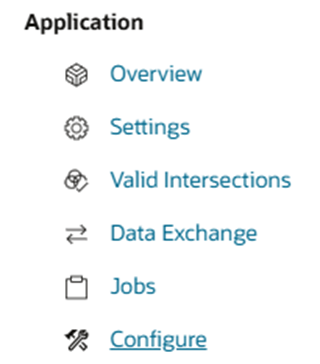
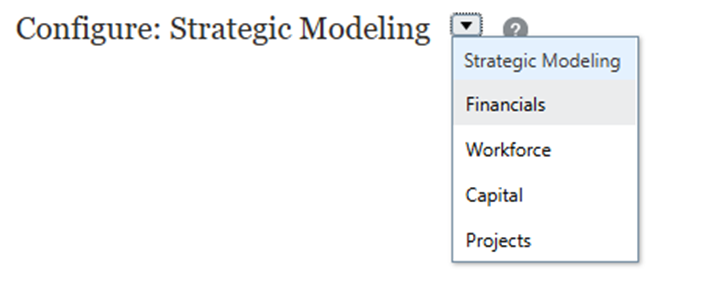
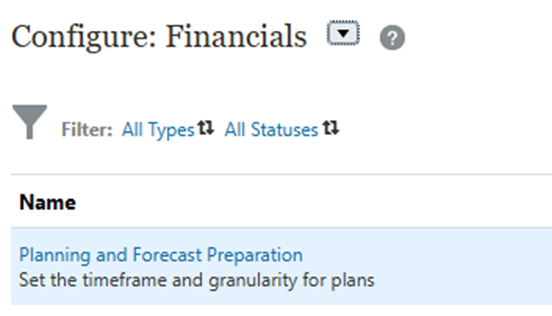
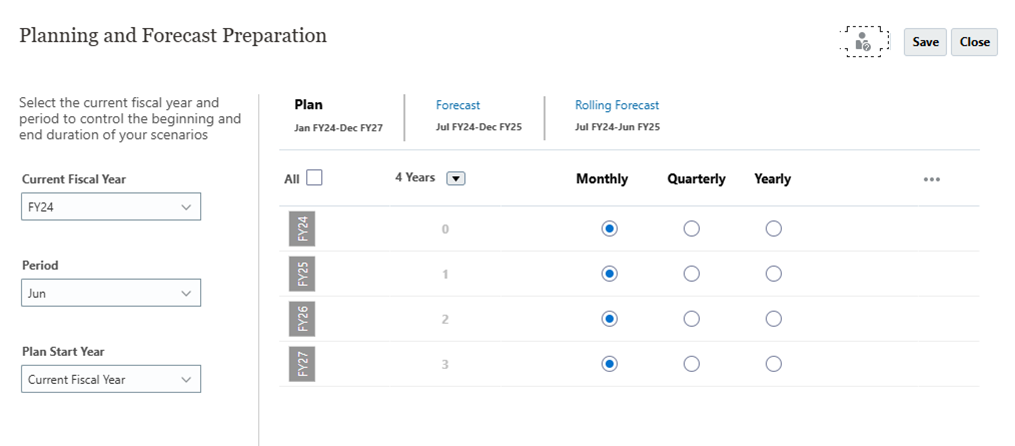
I run the two Groovy Scripts from a Windows .Cmd script. Never tried it from a pipeline/Job, but it what it would require is to populate the input parameters:
/* RTPS: {Month_End_Period} {Month_End_Year} {gRTPs_Budget_Year}*/
Alternatively the date could be set from Groovy getting the system date. When I encounter a need to do this then I’ll update the blog later. Here is the .cmd file:
Note that the business rules are run with system variables passed as parameters: Month_End_Period=%MonthEndMth% Month_End_Year=%MonthEndYr%
:: ***************************************************************************
:: NAME: iEPM_Set_SubVars.cmd
:: DESC: Set the month end variables.

::
::  Author : Nic Vos
::  Date : 26/03/14
::  Modified: When: Who: What
::
:: **************************************************************************

echo %date%-%time% Login to EPM
call ..\..\..\..\..\..\..\bin\iEPM_Login.cmd 2>&1


call epmautomate runBusinessRule iEPM_System_Set_Plan_Period_Substitution_Variables_groovy Month_End_Period=%MonthEndMth% Month_End_Year=%MonthEndYr% gRTPs_Budget_Year=%BudgetYr% 2>&1
IF %ERRORLEVEL% NEQ 0 CALL ..\..\..\..\..\..\..\bin\iEPM_Library.cmd STOP

call epmautomate runBusinessRule iEPM_Set_Open_Period Month_End_Period=%MonthEndMth% Month_End_Year=%MonthEndYr% 2>&1
IF %ERRORLEVEL% NEQ 0 CALL ..\..\..\..\..\..\..\bin\iEPM_Library.cmd STOP


call epmautomate logout -d > Logs\%JOBNAME%-%DMY%-epmautomate.log 2>&1
IF %ERRORLEVEL% NEQ 0 CALL ..\..\..\..\..\..\..\bin\iEPM_Library.cmd STOP


:: *******************************************************************************************************************
:: End of script
.
iEPM_System_Set_Plan_Period_Substitution_Variables_groovy
This is the script to update the variables, given the repetitive nature of all the variables to update, I’ve used a template with the generic code in. The first section is all about extracting the date from the inputs and then working out the relative Months, Quarters and Years and storing in Groovy variables for use in setting the EPM Sub Vars.
In a preceding .cmd script I extract the date from the system for the parameters as this is used by other batch processes within this system, but there is no reason why this can’t be modified to take the system date in Groovy.
/****************************************************************************
Name: iEPM_System_Set_Plan_Period_Substitution_Variables_groovy
Desc: Set substitution variables & values based on Month End


Author: Nic Vos Date: 28/6/23
Modifications: Date:Who:What

****************************************************************************/

/* RTPS: {Month_End_Period} {Month_End_Year} {gRTPs_Budget_Year}*/

%Template(name:="iEPMt_Library_groovy",application:="CovPlan",plantype:="OEP_FS",dtps:=())

def payload = []
def tempvar
def Curr_Qtr = 0
GregorianCalendar Month_End_Date = new GregorianCalendar()
GregorianCalendar Budget_End_Date = new GregorianCalendar()

String Current_Year
String Prior_Year1
String Forecast_Year1
String Forecast_Year2
String Forecast_Year3
String Budget_End_Year


// Get the inputs

String Budget_Year = rtps.gRTPs_Budget_Year.toString().replaceAll('"', '')
String Month_End_Period = rtps.Month_End_Period.toString().replaceAll('"', '')
String Month_End_Year = rtps.Month_End_Year.toString().replaceAll('"', '')
String Month_End_YY = rtps.Month_End_Year.toString().replaceAll('"', '')[-2..-1].toInteger()

// Assume budget runs for 2 years
String Plan_End_YY = rtps.gRTPs_Budget_Year.toString().replaceAll('"', '')[-2..-1].toInteger()+1

// Assume forecast ends after 2 full years
String Fcst_End_YY = rtps.Month_End_Year.toString().replaceAll('"', '')[-2..-1].toInteger()+2

/****************************************************************************
 Create a date object from the inputs
****************************************************************************/
// Forecast Start Date yyyy-MMM-dd
String Month_End="20"+Month_End_YY+"-"+Month_End_Period+"-01"
println "Month End $Month_End"


Month_End_Date.setTime(new Date().parse("yyyy-MMM-dd", Month_End))
// Last FULL month of actuals
String Actual_Month=(Month_End_Date.format("MMM"))
println "Actual_Month, $Actual_Month"

// Budget End date
String Budget_End="20"+Plan_End_YY+"-Dec-01"
println "Budget End $Budget_End"

Budget_End_Date.setTime(new Date().parse("yyyy-MMM-dd", Budget_End))


// Set the Quarter
switch (Month_End_Date.format("MM") as int){
  case 1..3:
    Curr_Qtr=1
    break
  case 4..6:
    Curr_Qtr=2
    break
  case 7..9:
    Curr_Qtr=3
    break
  default:
    Curr_Qtr=4
}
println "Curr_Qtr, $Curr_Qtr"

/****************************************************************************
MONTHS - Month_End_Date is a cumulative variable
****************************************************************************/
Month_End_Date.add(Calendar.MONTH, -1)
String Prior_Month1=(Month_End_Date.format("MMM"))
println "Prior_Month1, $Prior_Month1"

Month_End_Date.add(Calendar.MONTH, -1)
String Prior_Month2=(Month_End_Date.format("MMM"))
println "Prior_Month2, $Prior_Month2"

/* partial month of actuals & forecast */
Month_End_Date.add(Calendar.MONTH, 3)
String Partial_Forecast_Month=(Month_End_Date.format("MMM"))
println "Partial_Forecast_Month, $Partial_Forecast_Month"

String First_Forecast_Month=(Month_End_Date.format("MMM"))
println "First_Forecast_Month, $First_Forecast_Month"

/* full month of forecast */
Month_End_Date.add(Calendar.MONTH, 1)
String First_Full_Forecast_Month=(Month_End_Date.format("MMM"))
println "First_Full_Forecast_Month, $First_Full_Forecast_Month"

String First_Calendar_Month=(Month_End_Date.format("MMM"))
println "First_Calendar_Month, $First_Calendar_Month"


/****************************************************************************
YEARS
****************************************************************************/
// Budget Year End
  Budget_End_Year="FY"+(Budget_End_Date.format("YY"))
  println "Budget_End_Year, $Budget_End_Year"


// Reset the date object to input parameters
Month_End_Date.setTime(new Date().parse("yyyy-MMM-dd", Month_End))
if((Month_End_Date.format("MM") as int) < 12) {
  Current_Year="FY"+(Month_End_Date.format("YY"))
  println "Current_Year, $Current_Year"

  Month_End_Date.add(Calendar.YEAR, -1)
  Prior_Year1="FY"+(Month_End_Date.format("YY"))
  println "Prior_Year1, $Prior_Year1"

  Month_End_Date.add(Calendar.YEAR, 1)
  Forecast_Year1="FY"+(Month_End_Date.format("YY"))
  println "Forecast_Year1, $Forecast_Year1"

  Month_End_Date.add(Calendar.YEAR, 1)
  Forecast_Year2="FY"+(Month_End_Date.format("YY"))
  println "Forecast_Year2, $Forecast_Year2"

  Month_End_Date.add(Calendar.YEAR, 1)
  Forecast_Year3="FY"+(Month_End_Date.format("YY"))
  println "Forecast_Year3, $Forecast_Year3"

} else {
// when the close period is December and we're in January, then add extra 1 to the forecast year as close period is in last year
  Current_Year="FY"+(Month_End_Date.format("YY"))
  println "Current_Year, $Current_Year"

  Month_End_Date.add(Calendar.YEAR, -1)
  Prior_Year1="FY"+(Month_End_Date.format("YY"))
  println "Prior_Year1, $Prior_Year1"

  Month_End_Date.add(Calendar.YEAR, 2)
  Forecast_Year1="FY"+(Month_End_Date.format("YY"))
  println "Forecast_Year1, $Forecast_Year1"

  Month_End_Date.add(Calendar.YEAR, 1)
  Forecast_Year2="FY"+(Month_End_Date.format("YY"))
  println "Forecast_Year2, $Forecast_Year2"

  Month_End_Date.add(Calendar.YEAR, 1)
  Forecast_Year3="FY"+(Month_End_Date.format("YY"))
  println "Forecast_Year3, $Forecast_Year3"
}

/****************************************************************************

Set the OEP substitution variables

****************************************************************************/

  payload = [["name": "OEP_PlanEndYr", "value": Budget_End_Year, "planType": "OEP_FS"]]
     tempvar = setSubstitutionVariables("Local_Instance", "CovPlan", payload);
  payload = [["name": "OEP_PlanEndYr", "value": Budget_End_Year, "planType": "OEP_REP"]]
     tempvar = setSubstitutionVariables("Local_Instance", "CovPlan", payload);
  payload = [["name": "OEP_PlanEndYr", "value": Budget_End_Year, "planType": "OEP_WFP"]]
     tempvar = setSubstitutionVariables("Local_Instance", "CovPlan", payload);
  payload = [["name": "OEP_PlanEndYr", "value": Budget_End_Year, "planType": "OEP_WFSC"]]
     tempvar = setSubstitutionVariables("Local_Instance", "CovPlan", payload);

  payload = [["name": "OEP_CurMnth", "value": Actual_Month, "planType": "ALL"]]
     tempvar = setSubstitutionVariables("Local_Instance", "CovPlan", payload);
  payload = [["name": "OEP_CurMnth", "value": Actual_Month, "planType": "OEP_FS"]]
     tempvar = setSubstitutionVariables("Local_Instance", "CovPlan", payload);
  payload = [["name": "OEP_CurMnth", "value": Actual_Month, "planType": "OEP_WFSC"]]
     tempvar = setSubstitutionVariables("Local_Instance", "CovPlan", payload);
  payload = [["name": "OEP_CurMnth", "value": Actual_Month, "planType": "OEP_WFP"]]
     tempvar = setSubstitutionVariables("Local_Instance", "CovPlan", payload);
  payload = [["name": "OEP_CurMnth", "value": Actual_Month, "planType": "OEP_REP"]]
     tempvar = setSubstitutionVariables("Local_Instance", "CovPlan", payload);

  payload = [["name": "OEP_FcstMnth", "value": First_Forecast_Month, "planType": "OEP_FS"]]
     tempvar = setSubstitutionVariables("Local_Instance", "CovPlan", payload);
  payload = [["name": "OEP_FcstMnth", "value": First_Forecast_Month, "planType": "OEP_WFP"]]
     tempvar = setSubstitutionVariables("Local_Instance", "CovPlan", payload);
  payload = [["name": "OEP_FcstMnth", "value": First_Forecast_Month, "planType": "OEP_WFSC"]]
     tempvar = setSubstitutionVariables("Local_Instance", "CovPlan", payload);
  payload = [["name": "OEP_FcstMnth", "value": First_Forecast_Month, "planType": "OEP_REP"]]
     tempvar = setSubstitutionVariables("Local_Instance", "CovPlan", payload);

  payload = [["name": "OEP_CurQtr", "value": "Qtrly "+Curr_Qtr, "planType": "OEP_FS"]]
     tempvar = setSubstitutionVariables("Local_Instance", "CovPlan", payload);

  payload = [["name": "OEP_CurYr", "value": Current_Year, "planType": "ALL"]]
     tempvar = setSubstitutionVariables("Local_Instance", "CovPlan", payload);


  payload = [["name": "FCSTStartYr", "value": Forecast_Year1, "planType": "ALL"]]
     tempvar = setSubstitutionVariables("Local_Instance", "CovPlan", payload);

  payload = [["name": "OEP_FCSTStartYr", "value": Forecast_Year1, "planType": "OEP_FS"]]
     tempvar = setSubstitutionVariables("Local_Instance", "CovPlan", payload);
  payload = [["name": "OEP_FCSTStartYr", "value": Forecast_Year1, "planType": "OEP_WFP"]]
     tempvar = setSubstitutionVariables("Local_Instance", "CovPlan", payload);
  payload = [["name": "OEP_FCSTStartYr", "value": Forecast_Year1, "planType": "OEP_WFSC"]]
     tempvar = setSubstitutionVariables("Local_Instance", "CovPlan", payload);
  payload = [["name": "OEP_FCSTStartYr", "value": Forecast_Year1, "planType": "OEP_REP"]]
     tempvar = setSubstitutionVariables("Local_Instance", "CovPlan", payload);

  payload = [["name": "OEP_FcstEndYr", "value": Forecast_Year2, "planType": "OEP_FS"]]
     tempvar = setSubstitutionVariables("Local_Instance", "CovPlan", payload);
  payload = [["name": "OEP_FcstEndYr", "value": Forecast_Year2, "planType": "OEP_REP"]]
     tempvar = setSubstitutionVariables("Local_Instance", "CovPlan", payload);
  payload = [["name": "OEP_FcstEndYr", "value": Forecast_Year2, "planType": "OEP_WFP"]]
     tempvar = setSubstitutionVariables("Local_Instance", "CovPlan", payload);
  payload = [["name": "OEP_FcstEndYr", "value": Forecast_Year2, "planType": "OEP_WFSC"]]
     tempvar = setSubstitutionVariables("Local_Instance", "CovPlan", payload);

  payload = [["name": "OEP_NextYear", "value": Forecast_Year1, "planType": "OEP_WFSC"]]
     tempvar = setSubstitutionVariables("Local_Instance", "CovPlan", payload);
  payload = [["name": "OEP_NextYear", "value": Forecast_Year1, "planType": "OEP_REP"]]
     tempvar = setSubstitutionVariables("Local_Instance", "CovPlan", payload);
  payload = [["name": "OEP_NextYear", "value": Forecast_Year1, "planType": "OEP_FS"]]
     tempvar = setSubstitutionVariables("Local_Instance", "CovPlan", payload);
  payload = [["name": "OEP_NextYear", "value": Forecast_Year1, "planType": "OEP_WFP"]]
     tempvar = setSubstitutionVariables("Local_Instance", "CovPlan", payload);

  payload = [["name": "OEP_PriorYr", "value": Prior_Year1, "planType": "OEP_WFP"]]
     tempvar = setSubstitutionVariables("Local_Instance", "CovPlan", payload);
  payload = [["name": "OEP_PriorYr", "value": Prior_Year1, "planType": "OEP_WFSC"]]
     tempvar = setSubstitutionVariables("Local_Instance", "CovPlan", payload);
  payload = [["name": "OEP_PriorYr", "value": Prior_Year1, "planType": "OEP_REP"]]
     tempvar = setSubstitutionVariables("Local_Instance", "CovPlan", payload);
  payload = [["name": "OEP_PriorYr", "value": Prior_Year1, "planType": "OEP_FS"]]
     tempvar = setSubstitutionVariables("Local_Instance", "CovPlan", payload);

  payload = [["name": "OEP_YearRange", "value": Current_Year+":"+Forecast_Year1, "planType": "OEP_FS"]]
     tempvar = setSubstitutionVariables("Local_Instance", "CovPlan", payload);
 payload = [["name": "OEP_YearRange", "value": Current_Year+":"+Forecast_Year1, "planType": "OEP_WFSC"]]
     tempvar = setSubstitutionVariables("Local_Instance", "CovPlan", payload);
  payload = [["name": "OEP_YearRange", "value": Current_Year+":"+Forecast_Year1, "planType": "OEP_WFP"]]
     tempvar = setSubstitutionVariables("Local_Instance", "CovPlan", payload);
  payload = [["name": "OEP_YearRange", "value": Current_Year+":"+Forecast_Year1, "planType": "OEP_REP"]]
     tempvar = setSubstitutionVariables("Local_Instance", "CovPlan", payload);
TEMPLATE: iEPMt_Library_groovy
This template has generic calls for many types of function, the only one used in this instance is setSubstitutionVariables. I left the other functions in as they are there in my production environment. They are:
– runBusinessRule(String connectionName, String ruleName, Map runTimePrompts)
– generateRoleAssignmentReport(String connectionName, filename)
– moveUsersToGroup(String connectionName, String GroupName, List userList)
– setSubstitutionVariables(String connectionName, String Application, List subVarCollect)
– getAllSubstitutionVariables(String connectionName, String Application)
– getSubstitutionVariable(String connectionName, String Application, String subVarName)
– getPlanTypeSubstitutionVariable(String connectionName, String Application, String Plan, String subVarName)
– runDataLoadRule(String connectionName, String ruleName, String startPeriod, String endPeriod, String importMode, String exportMode, String fileName = ”)
– copyFile(sourceFileName, targetFileName, sUser, pwdFile, connectionName, sourceURL)
// Wait for REST job to be completed
int awaitCompletion(HttpResponse<String> jsonResponse, String connectionName, String operation) {
    final int IN_PROGRESS = -1
    if (!(200..299).contains(jsonResponse.status)) {
    	throwVetoException("Error occured waiting for response: $jsonResponse.statusText")
    }

    // Parse the JSON response to get the status of the operation. Keep polling the server until the operation completes.
    ReadContext ctx = JsonPath.parse(jsonResponse.body)
    int status = ctx.read('$.status')
    for(long delay = 50; status == IN_PROGRESS; delay = Math.min(1000, delay * 2)) {
        sleep(delay)
     String jobid=ctx.read('$.jobId')
        status = getJobStatus(connectionName, jobid);
    }

    println("$operation ${status == 0 ? "successful" : "failed"}.\n")
    return status
}

// Poll the server to get the job status
int getJobStatus(String connectionName, String jobId) {
    HttpResponse<String> pingResponse = operation.application.getConnection(connectionName).get("/aif/rest/V1/jobs/" + jobId).asString()
    return JsonPath.parse(pingResponse.body).read('$.status')
}

def runRESTJob(String connectionName, String payload, String jobType, String connType = 'APP') {
	//Connection conn = operation.application.getConnection(connectionName)
    //String relUrl = connType == 'DM' ? '/aif/rest/V1/' : '/HyperionPlanning/rest/v3/'

	HttpResponse<String> jsonResponse = operation.application.getConnection(connectionName)
    .post('/aif/rest/V1/jobs')
    .body(payload)
    .asString();
    sleep(3000);
//    println(jsonResponse.body)
    ReadContext ctx = JsonPath.parse(jsonResponse.body)

    int jobid=ctx.read('$.jobId')
    println "JOBID:"+ jobid

    int jobStatus = awaitCompletion(jsonResponse, connectionName, jobType);
    if (jobStatus < 0)
    {jobid=-1}

    return jobid
}

/******************************************************************************

Main Functions

******************************************************************************/


def runBusinessRule(String connectionName, String ruleName, Map runTimePrompts) {
    runTimePrompts = runTimePrompts.collectEntries{key,value -> [key, value.toString().replaceAll('"', '')]};

	String payload = json([
      "jobType":"Rules",
      "jobName":ruleName,
      "parameters": runTimePrompts
    ]);

    println(payload)

	return runRESTJob(connectionName, payload, "Run Business Rule");
}

def runDataMap(String connectionName, String dataMapName) {
	String payload = json([
      "jobType":"PLAN_TYPE_MAP",
      "jobName":dataMapName
    ]);

	return runRESTJob(connectionName, payload, "Run Data Map '$dataMapName'");
}

/******************************************************************************

USERS

******************************************************************************/
def generateRoleAssignmentReport(String connectionName, filename) {

	String scenario = "Generating Role assignment report in " + filename;
	String params = "jobtype=GENERATE_ROLE_ASSIGNMENT_REPORT&filename="+ filename;
	def url = null;
	def response = null;


try {
	HttpResponse<String> jsonResponse = operation.application.getConnection(connectionName)
    .post("/interop/rest/security/v1/roleassignmentreport" )
    .body(params)
    .asString();
	} catch (MalformedURLException e) {
		println "Please enter a valid URL"
	}
}


def moveUsersToGroup(String connectionName, String GroupName, List userList) {

  userList.each{println it}
  String payload = json(["groupname": GroupName,"users":userList ])
  println payload

	HttpResponse<String> jsonResponse = operation.application.getConnection(connectionName)
    .put("/interop/rest/security/v2/groups/adduserstogroup" )
    .body(payload)
    .asString();


    return 0;
}

def removeUsersFromGroup(String connectionName, String GroupName, List userList) {

  userList.each{println it}
  String payload = json(["groupname": GroupName,"users":userList ])
  println payload

	HttpResponse<String> jsonResponse = operation.application.getConnection(connectionName)
    .put("/interop/rest/security/v2/groups/removeusersfromgroup" )
    .body(payload)
    .asString();


    return 0;
}


/******************************************************************************

Substitution variables

******************************************************************************/
def setSubstitutionVariables(String connectionName, String Application, List subVarCollect) {

String payload = json(["items": subVarCollect]);

	HttpResponse<String> jsonResponse = operation.application.getConnection(connectionName)
    .post("/HyperionPlanning/rest/v3/applications/" + Application + "/substitutionvariables/")
    .body(payload)
    .asString();

    final int IN_PROGRESS = -1
    if (!(200..299).contains(jsonResponse.status)) {
    	throwVetoException("Error in setSubstitutionVariables: $jsonResponse.statusText");
    }
}


def getAllSubstitutionVariables(String connectionName, String Application) {
	HttpResponse<String> jsonResponse = operation.application.getConnection(connectionName)
    .get("/HyperionPlanning/rest/v3/applications/" + Application + "/substitutionvariables" )
    .asString();

    final int IN_PROGRESS = -1
    if (!(200..299).contains(jsonResponse.status)) {
    	throwVetoException("Error in getAllSubstitutionVariables: $jsonResponse.statusText");
    }
    // Parse the JSON response to get the details of the subvars.
def object = new JsonSlurper().parseText(jsonResponse.body) as Map
// println "Number of jobs returned: ${((List)object.items).size()}"
//object.items.each{println "Output $it"}

object.items.each { Map SubVar ->
      println "$SubVar.name,$SubVar.value,$SubVar.planType"
      }

    return 0;
}


def getSubstitutionVariable(String connectionName, String Application, String subVarName) {
	HttpResponse<String> jsonResponse = operation.application.getConnection(connectionName)
    .get("/HyperionPlanning/rest/v3/applications/" + Application + "/substitutionvariables/" + subVarName)
    .asString();

    final int IN_PROGRESS = -1
    if (!(200..299).contains(jsonResponse.status)) {
    	throwVetoException("Error in getSubstitutionVariable: $jsonResponse.statusText");
    }

    // Parse the JSON response to get the value of the subvar.
    ReadContext ctx = JsonPath.parse(jsonResponse.body);
    String sabVarVal = ctx.read('$.value')
    return sabVarVal;
}

def getPlanTypeSubstitutionVariable(String connectionName, String Application, String Plan, String subVarName) {

	HttpResponse<String> jsonResponse = operation.application.getConnection(connectionName)
    .get("/HyperionPlanning/rest/v3/applications/" + Application + "/plantypes/"+Plan+"/substitutionvariables/" + subVarName)
    .asString();
    final int IN_PROGRESS = -1
    if (!(200..299).contains(jsonResponse.status)) {
    	throwVetoException("Error in getSubstitutionVariable: $jsonResponse.statusText");
    }

    // Parse the JSON response to get the value of the subvar.
    ReadContext ctx = JsonPath.parse(jsonResponse.body);
    String sabVarVal = ctx.read('$.value')
    return sabVarVal;
}


/******************************************************************************

Run data load rule

******************************************************************************/
def runDataLoadRule(String connectionName, String ruleName, String startPeriod, String endPeriod, String importMode, String exportMode, String fileName = '') {

    	String payload = json([
          "jobType":"DATARULE",
          "jobName":ruleName,
          "startPeriod":startPeriod,
          "endPeriod":endPeriod,
          "importMode":importMode,
          "exportMode":exportMode,
          "fileName":"Testfile"
        ]);

        def dlrStatus = runRESTJob(connectionName, payload, "Run Data Load Rule for " + startPeriod +  " to " + endPeriod );
//        def (dlrStatus, dlrid) = runRESTJob(connectionName, payload, "Run Data Load Rule for " + startPeriod +  " to " + endPeriod );
/*        def returnvals = runRESTJob(connectionName, payload, "Run Data Load Rule for " + startPeriod +  " to " + endPeriod );
        def dlrStatus = returnvals[0];
        def dlrid = returnvals[1];
  */
//        println "DLRid:"+dlrid;

    return dlrStatus;
}

/******************************************************************************

Copy file from one instance to another

******************************************************************************/
def copyFile(sourceFileName, targetFileName, sUser, pwdFile, connectionName, sourceURL) {

    println "    Executing copyFile Function";


/*  String payload = json([
    "sourceFileName":sourceFileName,
	"userName":sUser,
	"pwd":pwdFile,
	"sourceURL":sourceURL,
	"targetFileName":targetFileName
    ]);

	HttpResponse<String> jsonResponse = operation.application.getConnection(connectionName)
    .post('/interop/rest/v2/files/copyfrominstance')
    .body(payload)
    .asString();
    sleep(3000);*/
/*    def jobStatus = awaitCompletion(jsonResponse, "Local_Instance", "Delete File");

    return jobStatus*/

}
iEPM_Set_Open_Period
The final step is to set the open periods as it would appear in the Scenario dimension. This could have been combined with the previous script, but as I implemented them at two different times, I wanted to keep some degree of segregation.
/****************************************************************************
Name: iEPM_Set_Open_Period
Desc: Set the Open & Closed periods on the scenario dimension

Author: Nic Vos
Date: 2/4/25

Modifications:
Date:     Who:          What:


****************************************************************************/
/* RTPS: {Month_End_Period} {Month_End_Year} */


String dimensionName = 'Scenario'
GregorianCalendar Month_End_Date = new GregorianCalendar()

String Current_Year
String Prior_Year1
String Forecast_Year1
String Forecast_Year2
String Forecast_Year3

Cube[] cubes = operation.application.getCubes()

// Get the inputs

String Month_End_Period = rtps.Month_End_Period.toString().replaceAll('"', '')
String Month_End_Year = rtps.Month_End_Year.toString().replaceAll('"', '')
String Month_End_YY = rtps.Month_End_Year.toString().replaceAll('"', '')[-2..-1].toInteger()


// Assume forecast ends after 2 full years
String Fcst_End_YY = rtps.Month_End_Year.toString().replaceAll('"', '')[-2..-1].toInteger()+2

/****************************************************************************
 Create a date object from the inputs
****************************************************************************/
// Forecast Start Date yyyy-MMM-dd
String Month_End="20"+Month_End_YY+"-"+Month_End_Period+"-01"
println "Month End $Month_End"


Month_End_Date.setTime(new Date().parse("yyyy-MMM-dd", Month_End))
// Last FULL month of actuals
String Actual_Month=(Month_End_Date.format("MMM"))
println "Actual_Month, $Actual_Month"


/****************************************************************************
MONTHS - Month_End_Date is a cumulative variable
****************************************************************************/

/* partial month of actuals & forecast */
Month_End_Date.add(Calendar.MONTH, 1)
String Partial_Forecast_Month=(Month_End_Date.format("MMM"))
println "Partial_Forecast_Month, $Partial_Forecast_Month"


/****************************************************************************
YEARS
****************************************************************************/

// Reset the date object to input parameters
Month_End_Date.setTime(new Date().parse("yyyy-MMM-dd", Month_End))
if((Month_End_Date.format("MM") as int) < 12) {
  Current_Year="FY"+(Month_End_Date.format("YY"))
  println "Current_Year, $Current_Year"

  Month_End_Date.add(Calendar.YEAR, -1)
  Prior_Year1="FY"+(Month_End_Date.format("YY"))
  println "Prior_Year1, $Prior_Year1"

  Month_End_Date.add(Calendar.YEAR, 1)
  Forecast_Year1="FY"+(Month_End_Date.format("YY"))
  println "Forecast_Year1, $Forecast_Year1"

  Month_End_Date.add(Calendar.YEAR, 1)
  Forecast_Year2="FY"+(Month_End_Date.format("YY"))
  println "Forecast_Year2, $Forecast_Year2"

  Month_End_Date.add(Calendar.YEAR, 1)
  Forecast_Year3="FY"+(Month_End_Date.format("YY"))
  println "Forecast_Year3, $Forecast_Year3"

} else {
// when the close period is December and we're in January, then add extra 1 to the forecast year as close period is in last year
  Current_Year="FY"+(Month_End_Date.format("YY"))
  println "Current_Year, $Current_Year"

  Month_End_Date.add(Calendar.YEAR, -1)
  Prior_Year1="FY"+(Month_End_Date.format("YY"))
  println "Prior_Year1, $Prior_Year1"

  Month_End_Date.add(Calendar.YEAR, 2)
  Forecast_Year1="FY"+(Month_End_Date.format("YY"))
  println "Forecast_Year1, $Forecast_Year1"

  Month_End_Date.add(Calendar.YEAR, 1)
  Forecast_Year2="FY"+(Month_End_Date.format("YY"))
  println "Forecast_Year2, $Forecast_Year2"

  Month_End_Date.add(Calendar.YEAR, 1)
  Forecast_Year3="FY"+(Month_End_Date.format("YY"))
  println "Forecast_Year3, $Forecast_Year3"
}
/****************************************************************************
END OF DATE SETTING
****************************************************************************/


// Get the dimension of the member in question
Dimension dimension = operation.application.getDimension(dimensionName, cubes)

// Get the member
Member ScenarioMbr = dimension.getMember("OEP_Forecast")

// Print the map to the log
def memberProps = ScenarioMbr.toMap()

// Print the member name
println ScenarioMbr.toString()

ScenarioMbr.dimension.saveMember(["Member":"OEP_Actual", "End Year":Current_Year ] as Map <String, Object>)
ScenarioMbr.dimension.saveMember(["Member":"OEP_Actual", "End Period":Actual_Month ] as Map <String, Object>)


ScenarioMbr.dimension.saveMember(["Member":"OEP_Forecast", "End Year":Forecast_Year2 ] as Map <String, Object>)
ScenarioMbr.dimension.saveMember(["Member":"OEP_Forecast", "End Period":"Dec" ] as Map <String, Object>)
ScenarioMbr.dimension.saveMember(["Member":"OEP_Forecast", "Start Year":Forecast_Year1 ] as Map <String, Object>)
ScenarioMbr.dimension.saveMember(["Member":"OEP_Forecast", "Start Period":Partial_Forecast_Month ] as Map <String, Object>)