Data Extract with Ancestor Meta Data
From time to time requirements to publish meta data along with an extract come up. I recently had a requirement to produce an extract with column headers a bit like this:

This was two dimensions, the bottom row is just level 0 members, the second row up is level 0 members with parents, grandparents & great grandparents stacked up on top.
Extracting data with a row or column members ancestors was something that was not possible within Planning until the advent of Groovy. It gives us the ability to interrogate the member properties and retrieve the parent value for the member, and by repeating the exercise get the grandparent, great grandparent and so on.
createDataExporter
As this is a data export, I thought I’d start off by looking at the createDataExporter
/****************************************************************************
Name: sample createDataExporter
Desc: Test report for performance
Author: Nic Vos
Date: 02/04/25

Modifications:
Date:     Who:          What:

****************************************************************************/

/* RTPS:  */

Cube cube = operation.application.getCube("PCM_REP")
 cube.createDataExporter()
 .setDateFormat("dd/MM/yyyy")
 .setDelimiter(',')
 .setColumnMemberNames(['Total Business Unit','BU_UREIN','BU_UREIN','BU_UREIN','BU_UREDT','Total Maintenance Acquisition','MA_Acquisition','MA_Maintenance','MA_Development','MA_Acquisition'])
 .setRowFilterCriteria('FY24','All Cost Pool','199999-BAU Total',"Financial Statements","YearTotal","Total Entity M&A", "Actuals", "Working Baseline","Net Balance","Calculation Rules","Total Service Code","Total Product")

 .setDataExportFormat(COLUMN_FORMAT_WITH_DIM_HEADERS)
 .setErrorFileName("sampleError.log")
 .exportDataToFile("sample.csv")
The problem with this is here:
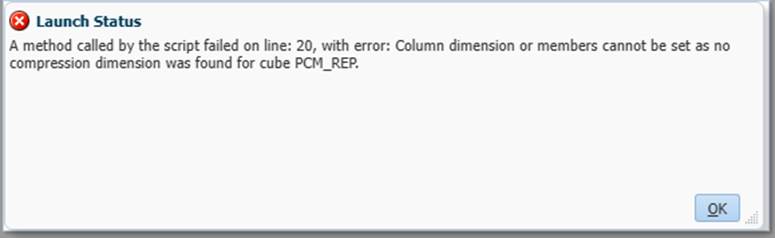
The issue was that in my EPCM the ASO has no compression dimension set and as I need the columns in the output I moved onto the flexibleDataGridDefinitionBuilder.
flexibleDataGridDefinitionBuilder
I didn’t bother to look at the DataGridDefinition builder, to quote Oracle: “This builder should be preferred over DataGridDefinitionBuilder as it supports exclusions and Dimension and Member references instead of just Strings for arguments. It also auto computes the dimensions from the members on various axis if dimensions are not specified.”
So I set up a basic export to see the output
/****************************************************************************
Name: Sample I
Desc: Basic output of the flexibleDataGridDefinitionBuilder

Author: Nic Vos
Date: 02/04/25

Modifications:
Date:     Who:          What:

****************************************************************************/
/* RTPS:  */

Cube cube = operation.application.getCube("PCM_REP") //set cube

// By varying the column members will impact the number of rows output with the supress missing as the supress is on rows, so shorter rows will remove more missings

def dataGrid = cube.flexibleDataGridDefinitionBuilder() //set grid def obj


dataGrid.setPov("AC_Total_Fin","YearTotal","EN_Total_MA", "Actuals", "VE_WRKG_Baseline","PCM_Net Balance","PCM_Calculation Rules","Total Service Code","Total Product")
dataGrid.addColumn('Total Business Unit','BU_UREIN','BU_UREDT','Total Maintenance Acquisition','MA_Acquisition','MA_Maintenance','MA_Development') //set column members
dataGrid.addRow('FY24','All Cost Pool','ILvl0Descendants(CC_199999)') //set row members

//set suppression settings
dataGrid.setSuppressMissingRows(true)
dataGrid.setSuppressMissingBlocks(true)
dataGrid.setSuppressMissingSuppressesZero(true)

Writer exportData = createFileWriter("sample.csv")


cube.loadGrid(dataGrid.build(),false).withCloseable { grid ->
  grid.dataCellIterator().each {
      exportData.write it.getMemberNames() as String
      exportData.write it.formattedValue as String
      exportData.write  "\n"
    }
}

exportData.close()
Here is the output:
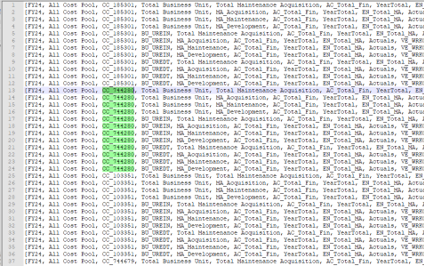
What the DataGridDefinitionBuilder has done is create a single column of data values with repeating rows for the columns specified. There are two dimensions in the columns:
- ‘Total Business Unit’,’BU_UREIN’,’BU_UREDT’
- ‘Total Maintenance Acquisition’,’MA_Acquisition’,’MA_Maintenance’,’MA_Development’
Giving a combination of 12 members. Even if the value is empty it creates the record unless every value is empty, then it will respect the setSuppressMissingRows option.
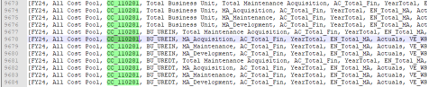
With this I figured that I can pivot the data, which I’ll tackle later.
Create the Headers
Having got the basic output I needed to see how to get the header data.
First a quick look at the properties of a member:
String dimensionName = 'Business Unit'
Cube[] cubes = operation.application.getCubes()

// Get the dimension of the member in question
Dimension dimension = operation.application.getDimension(dimensionName, cubes)
Member AccountMbr = dimension.getMember("BU_UREIN")
def memberProps = AccountMbr.toMap()

// Print the member name
println "Member properties for: ${AccountMbr.toString()}"

// Print every property and corresponding property value
for ( e in memberProps ) {
  println "${e.key} = ${e.value}"
}
The println sends the output to the job details viewer:
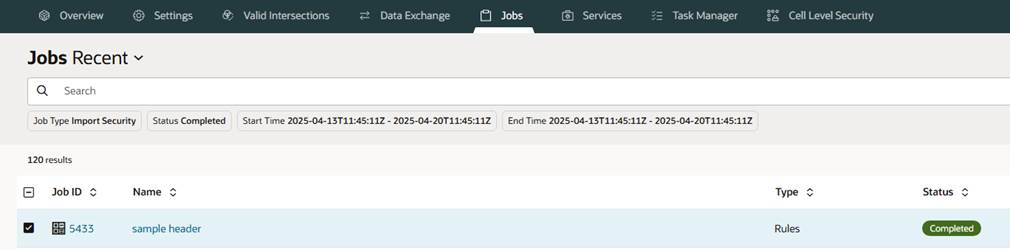
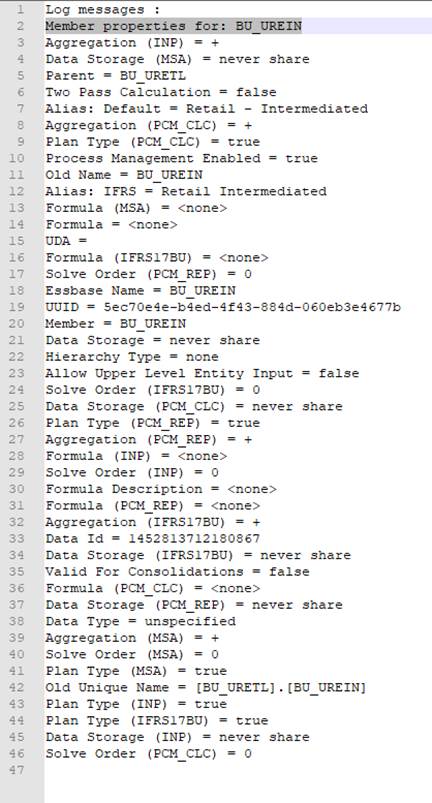
The ones I’m interested in are:
- Member
- Alias: Default
- Parent
So from my extract I’ll have the level 0 member name, I need to combine that somehow to the ancestors in a MAP of key value pairs where the value will be a LIST of ancestors. Here is the code to produce the MAP.
/****************************************************************************
Name: Sample header
Desc: Output with ancesters stacked on column headers
Author: Nic Vos
Date: 02/04/25

Modifications:
Date:     Who:          What:
****************************************************************************/
/* RTPS:  */

String parentName
String grandparentName
String greatgrandparentName

def parentProps
def grandparentProps
def greatgrandparentProps

Cube cube = operation.application.getCube("PCM_REP") //set cube

String sbuMembers = '"BU_UREIN","BU_UREDT","BU_PSLPH","BU_PSLRE","BU_UWRPL","BU_PSLSC","BU_DFBNS","BU_ANGGL","BU_ANGUL","BU_ANVEG","BU_EALTM","BU_USLLM","BU_RSEIA","BU_RSLPH","BU_RSADL","BU_WPSPH","BU_WPSRE","BU_WPIPH","BU_EUHPH","BU_PNPPH","BU_PNPRE","BU_USNLF","BU_UGPDV","BU_UAVIV"'
Dimension dimension = operation.application.getDimension('Business Unit', cube)
List<Member> lbuMembers = dimension.getEvaluatedMembers("@LIST($sbuMembers)",cube)

/****************************************************************************
Create the ancestor headers
****************************************************************************/

def mapAncestors = [:]
String[] listAncestors
lbuMembers.each { mbr ->
    def memberProps = mbr.toMap()
    if (memberProps["Parent"] != null){
      parentName = memberProps["Parent"]
      Member myParent = dimension.getMember(parentName,cube)
      parentProps = myParent.toMap()
    }
    if (parentProps["Parent"] != null){
      grandparentName = parentProps["Parent"]
      Member mygrandParent = dimension.getMember(grandparentName,cube)
      grandparentProps = mygrandParent.toMap()
    }
    if (grandparentProps["Parent"] != null){
      greatgrandparentName= grandparentProps["Parent"]
      Member mygreatgrandParent = dimension.getMember(greatgrandparentName,cube)
      greatgrandparentProps = mygreatgrandParent.toMap()
    }
// set up the map to a list
mapAncestors[(memberProps["Member"])]=[
                 memberProps["Alias: Default"],
                 parentProps["Alias: Default"],
                 grandparentProps["Alias: Default"],
                 greatgrandparentProps["Alias: Default"]
                 ]
}
mapAncestors.each{key,item ->
listAncestors = item.toString().replaceAll("\\[","").replaceAll("]","").split(",")

println "$key : $item"
println listAncestors[0].trim()
println listAncestors[1].trim()
println listAncestors[2].trim()
println listAncestors[3].trim()
}
The output in the job console viewer. The MAP separator is the colon :, the LIST is delimited with comma in the square brackets.
Log messages :
BU_UREIN : [Retail - Intermediated, Retail, Pensions & Savings, All Segment]
Retail - Intermediated
Retail
Pensions & Savings
All Segment
BU_UREDT : [Retail - D2C, Retail - Direct Total, Retail, Pensions & Savings]
Retail - D2C
Retail - Direct Total
Retail
Pensions & Savings
BU_PSLPH : [P&S Legacy, P&S Legacy, Pensions & Savings, All Segment]
P&S Legacy
P&S Legacy
Pensions & Savings
All Segment
BU_PSLRE : [P&S Legacy , P&S Legacy, Pensions & Savings, All Segment]
P&S Legacy
P&S Legacy
Pensions & Savings
All Segment
Complete solution
Combining those two script together there are three basic steps:
- Get the ancestor information required for the header rows.
- Extract one record or data and generate the column headers.
- Extract and output the required data.
Pivot Data
As the flexibleDataGridDefinitionBuilder actually outputs a single data column, the data needs to be pivoted for the output. This is simply done by output each value to the file. The exportData.write continues to write to the same line until a “/n” is sent. When the row headers change this indicates that the end of the columns is reached, and the new line is required.
The comments in the code should help with understanding what is happening in each section.
/****************************************************************************
Name: Sample
Desc: Output with ancesters stacked on column headers

Author: Nic Vos
Date: 02/04/25

Modifications:
Date:     Who:          What:

****************************************************************************/
/* dimension order
Account Period Years Scenario Entity Version PCM_Balance PCM_Rule "Business Unit" "Cost Centre" CostPool ICP "Maintenance Acquisition" Product
*/

/* RTPS: {aRTP_Years} */

String sYears = rtps.aRTP_Years.toString().replaceAll('"', '')

// initialise the header records with a couple of blanks so that the columns line up
String buHeader =",,,"
String amdoHeader =",,,"
String mbrAlias =",,"
String parentName
String parentAlias =",,"
String grandparentName
String grandparentAlias =",,"
String greatgrandparentName
String greatgrandparentAlias =",,"
def parentProps
def grandparentProps
def greatgrandparentProps

String rowYear, rowCostPool, rowCostCentre

Cube cube = operation.application.getCube("PCM_REP") //set cube

// long list of dimension members to appear as the column members
String sbuMembers = '"BU_UREIN","BU_UREDT","BU_PSLPH","BU_PSLRE","BU_UWRPL","BU_PSLSC","BU_DFBNS","BU_ANGGL","BU_ANGUL","BU_ANVEG","BU_EALTM","BU_USLLM","BU_RSEIA","BU_RSLPH","BU_RSADL","BU_WPSPH","BU_WPSRE","BU_WPIPH","BU_EUHPH","BU_PNPPH","BU_PNPRE","BU_USNLF","BU_UGPDV","BU_UAVIV"'
Dimension dimension = operation.application.getDimension('Business Unit', cube)
// Create a list of "Member" objects to get the parent member from
List<Member> lbuMembers = dimension.getEvaluatedMembers("@LIST($sbuMembers)",cube)


/****************************************************************************
1. Create the ancestor members
****************************************************************************/

// Here use a MAP for the member name and a LIST of it's ancestors
def mapAncestors = [:]
String[] listAncestors

lbuMembers.each { mbr ->
    def memberProps = mbr.toMap()

    if (memberProps["Parent"] != null){
      parentName = memberProps["Parent"]
      Member myParent = dimension.getMember(parentName,cube)
      parentProps = myParent.toMap()
    }
// Cascade through grandparent and great grandparent to get each successive generations properties
    if (parentProps["Parent"] != null){
      grandparentName = parentProps["Parent"]
      Member mygrandParent = dimension.getMember(grandparentName,cube)
      grandparentProps = mygrandParent.toMap()
    }

    if (grandparentProps["Parent"] != null){
      greatgrandparentName= grandparentProps["Parent"]
      Member mygreatgrandParent = dimension.getMember(greatgrandparentName,cube)
      greatgrandparentProps = mygreatgrandParent.toMap()
    }

// Create a MAP of the members to the LIST of the ancestors
mapAncestors[(memberProps["Member"])]=[
                 memberProps["Alias: Default"],
                 parentProps["Alias: Default"],
                 grandparentProps["Alias: Default"],
                 greatgrandparentProps["Alias: Default"]
                 ]
}


/****************************************************************************
2. Create the headers

use the dataGrid.build to pull the first record from the extract.  This is
a number of rows that represents the columns specified. Then iterate through
the rows, concatenating the alias strings of parent, grandparent, great
grandparent to then output to the file as a single record.
****************************************************************************/

Writer exportData = createFileWriter("sample.csv")

def dataGrid = cube.flexibleDataGridDefinitionBuilder() //set grid def obj
dataGrid.setPov("AC_Total_Fin","YearTotal","EN_Total_MA", "Actuals", "VE_WRKG_Baseline","PCM_Net Balance","PCM_Calculation Rules","Total Service Code","Total Product")
dataGrid.addColumn('Total Business Unit','Total Maintenance Acquisition',lbuMembers,'MA_Acquisition','MA_Maintenance','MA_Development','MA_Other') //set column members


dataGrid.addRow(sYears,"All Cost Pool",'CC_199999') //set row for a single combination of members to produce the header output

cube.loadGrid(dataGrid.build(),false).withCloseable { grid ->
  grid.dataCellIterator().each {
// for the block of records, it's the header, output as the column headers
    if(it.getMemberName("Business Unit") == 'Total Business Unit' &&  it.getMemberName("Maintenance Acquisition") == 'Total Maintenance Acquisition' ||
       it.getMemberName("Business Unit") != 'Total Business Unit' &&  it.getMemberName("Maintenance Acquisition") != 'Total Maintenance Acquisition'){
         listAncestors = mapAncestors[(it.getMemberName('Business Unit'))].toString().replaceAll("\\[","").replaceAll("]","").split(",")

  if(!mapAncestors[(it.getMemberName('Business Unit'))]) { listAncestors[0]="" }


  if(listAncestors.size()==4){
      greatgrandparentAlias = greatgrandparentAlias + "," + listAncestors[3].trim()} else {
      greatgrandparentAlias = greatgrandparentAlias + "," + ""}
  if(listAncestors.size()>=3){
      grandparentAlias = grandparentAlias + "," + listAncestors[2].trim()} else {
      grandparentAlias = grandparentAlias + "," + ""}
  if(listAncestors.size()>=2){
      parentAlias = parentAlias + "," + listAncestors[1].trim()} else {
      parentAlias = parentAlias + "," + ""}
  if(listAncestors.size()>=1){
      mbrAlias = mbrAlias + "," + listAncestors[0].trim()} else {
      mbrAlias = mbrAlias + "," + ""}

        buHeader = buHeader + it.getMemberName("Business Unit")  + ','
        amdoHeader = amdoHeader + it.getMemberName("Maintenance Acquisition")  + ','


     }
  } //celliterator
} //loadgrid
exportData.write "$greatgrandparentAlias \n"
exportData.write "$grandparentAlias \n"
exportData.write "$parentAlias \n"
exportData.write "$mbrAlias \n"
exportData.write "$buHeader \n"
exportData.write "$amdoHeader \n"


/****************************************************************************
3. Create the main output

use the dataGrid.build again to pull all the records required in the output
i.e. all the cost centres this time.
to PIVOT the data, keep writing to the same line, throw a newline when the
Row Headers change.
****************************************************************************/

dataGrid.addRow(sYears,"All Cost Pool",'ILvl0Descendants(CC_199999)') //set row members to all members required in the output

//set suppression settings. n.b. this will only supress a row that is empty for all the defined column members
dataGrid.setSuppressMissingRows(true)
dataGrid.setSuppressMissingBlocks(true)
dataGrid.setSuppressMissingSuppressesZero(true)

cube.loadGrid(dataGrid.build(),false).withCloseable { grid ->
  grid.dataCellIterator().each {

// The flexibleDataGridDefinitionBuilder output is really a single data column with repeating rows defined by the column headers.
// Here, test if the row members have changed, then throw a new record
    if(it.getMemberName("Years") != rowYear || it.getMemberName("CostPool") != rowCostPool || it.getMemberName("Cost Centre") != rowCostCentre){

         rowYear = it.getMemberName("Years")
         rowCostPool = it.getMemberName("CostPool")
         rowCostCentre = it.getMemberName("Cost Centre")

/****************************************************************************
 Throw a new line and then output the row headers
****************************************************************************/
         exportData.write("\n")
         exportData.write rowYear + ',' + rowCostPool  + ',' + rowCostCentre + ','
         }

// this filter is to stop the subtotals columns being output. By default, with two column dimensions specified all
// combinations will be output, here I only allow the grand total and then all level 0 combinaitons
    if(it.getMemberName("Business Unit") == 'Total Business Unit' &&  it.getMemberName("Maintenance Acquisition") == 'Total Maintenance Acquisition' ||
       it.getMemberName("Business Unit") != 'Total Business Unit' &&  it.getMemberName("Maintenance Acquisition") != 'Total Maintenance Acquisition'){

// by outputing the value without a "\n" it will continue on the same row, effectively pivoting the data
         exportData.write it.formattedValue + ','

       }

  } //celliterator
} //loadgrid

exportData.close()
