Optimising Cost Allocations in Hybrid Essbase
I was curious to see how an allocation in a Hybrid model would perform without aggregating any of the dimensions in a BSO way, thus relying on the power of the ASO aggregations to get the top level numbers to be allocated.
Before I started, I had some reservations about this as I was thinking that to take the top number to be allocated would continuously fire off the dynamic calculation every time an apportionment was made.
So I had an idea to get round this, and that was to use an ARRAY in the calculation script to store the ratio number of the allocation, the idea being that this ARRAY would store the required amounts in memory.
I loaded up my test bed model having identical BSO, ASO and Hybrid cubes, which for reference is like this:
| Members in Dim | Level 0 | |
| Account | 948 | 759 |
| Period | 32 | 14 |
| Balance_Type | 18 | 5 |
| Year | 15 | 14 |
| Scenario | 21 | 17 |
| Version | 23 | 18 |
| Currency | 7 | 5 |
| Members in Dim | Level 0 | |
| View | 25 | 22 |
| Department | 28 | 27 |
| Purchase_Class | 26 | 16 |
| Location | 43 | 38 |
| Channel | 131 | 110 |
| Item (Products) | 18222 | 16979 |
| 13 Dimensions |
Total Blocks 959383
In all my scripts, I did the allocation onto View dimension member “Alloc1”, this made it easy to clear down between tests and ensured that my scripts had to create the blocks and not muddy my results due to the blocks already existing. The core data was on the View dimension member “Base”
First Attempt At It
So for the first calculation script I went straight in with a simple allocation of Gross Salaries (AC7114) across all Item dimension members based on Sales (AC4000CR).
SET HYBRIDBSOINCALCSCRIPT FULL;
ARRAY allocRatio[Period];

FIX("Alloc1")
  CLEARBLOCK ALL;
ENDFIX

/* Create a parking lot block in a non aggretaing member "No_Item" so not to count add it into totals */
FIX("No_Item","Undefined_Location","Undefined_Channel","Undefined_Department","Undefined_Purchase_Class","FY20","Actual","Movement","Netsuite_Load_IS","FCGBP", @RELATIVE("YearTotal",0))
/* "TL"->"TC"->"TD"->"TPC"->"TI" These are the total members of the aggregating dimensions */
  "AC7114"(
    allocRatio = "AC7114"->"TL"->"TC"->"TD"->"TPC"->"TI"->"Base" / "AC4000CR"->"TL"->"TC"->"TD"->"TPC"->"TI"->"Base";)
ENDFIX

FIX("Undefined_Location","Undefined_Channel","Undefined_Department","Undefined_Purchase_Class","FY20","Actual","Movement","Netsuite_Load_IS","FCGBP")
  FIXPARALLEL(8,@REMOVE(@RELATIVE("TI",0),"Undefined_Item"))
    FIX(@RELATIVE("YearTotal",0),"AC7114")
    "Alloc1"(
    "Alloc1" = "AC4000CR"->"TL"->"TC"->"TD"->"TPC"->"Base" * allocRatio;
      )
   ENDFIX
  ENDFIXPARALLEL
ENDFIX
It ran for hours and I killed it, scratching my head wondering why. To do a top level retrieve in Excel took a second, so I looked in the job output
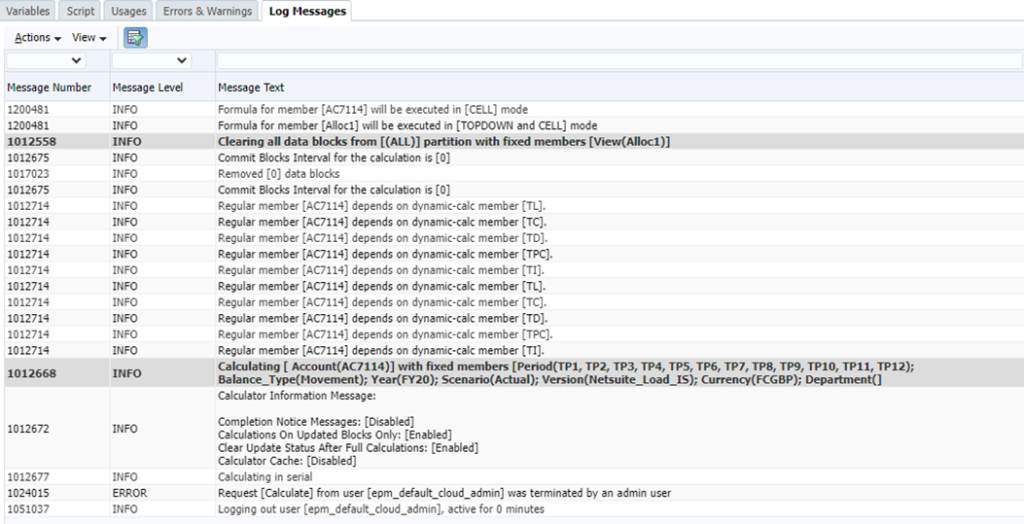
It was missing the one vital thing, a message telling me that Hybrid mode is enabled like below:

So I checked the Oracle documentation, no mention that it doesn’t work with ARRAY, but clearly it doesn’t so back to the drawing board.
Second Attempt
For the next step of my investigation, I tried the allocation by calculating the ratio every time the formula is run
SET HYBRIDBSOINCALCSCRIPT FULL;

FIX("Alloc1")
  CLEARBLOCK ALL;
ENDFIX

FIX("Undefined_Location","Undefined_Channel","Undefined_Department","Undefined_Purchase_Class","FY20","Actual","Movement","Netsuite_Load_IS","FCGBP")
  FIXPARALLEL(8,@REMOVE(@RELATIVE("TI",0),"Undefined_Item"))
    FIX(@RELATIVE("YearTotal",0),"AC7114")
    "Alloc1"(
      "Alloc1" = "AC4000CR"->"TL"->"TC"->"TD"->"TPC"->"Base" * ("AC7114"->"TL"->"TC"->"TD"->"TPC"->"TI"->"Base" / "AC4000CR"->"TL"->"TC"->"TD"->"TPC"->"TI"->"Base") ;
      )
   ENDFIX
  ENDFIXPARALLEL
ENDFIX
This ran in 4 seconds, which I thought was pretty good, but I was still suspicious nothing really happened, so I got out smart view and did a retrieve.
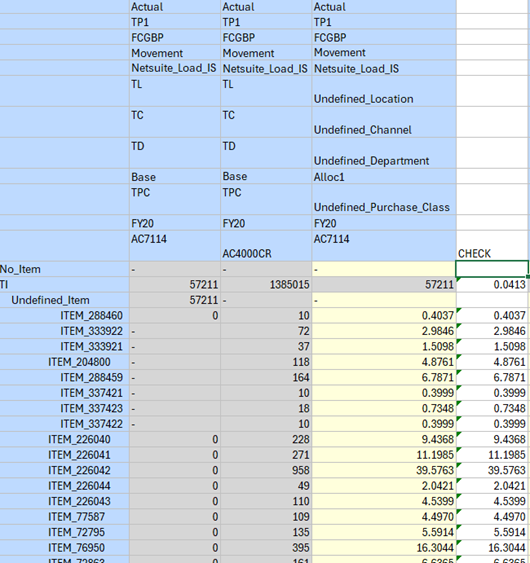
Looks OK.
Third Go
Well, the original idea was to not keep recalculating the allocation ratio, so I simply hard coded the value into the script 0.041322917915901.
SET HYBRIDBSOINCALCSCRIPT FULL;

FIX("Alloc1")
  CLEARBLOCK ALL;
ENDFIX

FIX("Undefined_Location","Undefined_Channel","Undefined_Department","Undefined_Purchase_Class","FY20","Actual","Movement","Netsuite_Load_IS","FCGBP")
  FIXPARALLEL(8,@REMOVE(@RELATIVE("TI",0),"Undefined_Item"))
    FIX(@RELATIVE("YearTotal",0),"AC7114")
    "Alloc1"(
    "Alloc1" = "AC4000CR"->"TL"->"TC"->"TD"->"TPC"->"Base" * 0.041322917915901;
      )
   ENDFIX
  ENDFIXPARALLEL
ENDFIX
This ran in 0.6 second, an incredible difference, so I knew that my hypothesis to store the number was a good idea, but the question was how?
Expanded Allocation
Anyway, a four second calc script isn’t really long enough to test performance, so I expanded the allocation to cross 3 dimensions, Item, Channel and Purchase Class.
SET HYBRIDBSOINCALCSCRIPT FULL;

FIX("Alloc1")
  CLEARBLOCK ALL;
ENDFIX

FIX("Undefined_Location","Undefined_Department", "FY20", "Actual", "Movement", "Netsuite_Load_IS", "FCGBP", @RELATIVE("TC",0), @RELATIVE("TPC",0))
  FIXPARALLEL(8,@REMOVE(@RELATIVE("TI",0),"Undefined_Item"))
    FIX("TP1","AC7114")
      "Alloc1"(
      "Alloc1" = "AC7114"->"TL"->"TC"->"TD"->"TPC"->"TI"->"Base" / "AC4000CR"->"TL"->"TC"->"TD"->"TPC"->"TI"->"Base" * "AC4000CR"->"Base"->"TL"->"TD";
      )
    ENDFIX
  ENDFIXPARALLEL
ENDFIX
This ran in 161 seconds, a much more substantive test.
Fifth Run
Then I substituted the calculation for the hard coded line
“Alloc1” = 0.041322917915901 * “AC4000CR”->”Base”->”TL”->”TD”;
The calculation time then came down to 0.3 second. A bit unbelievable that it did anything so I went back to smart view to check.
And sure enough it was OK
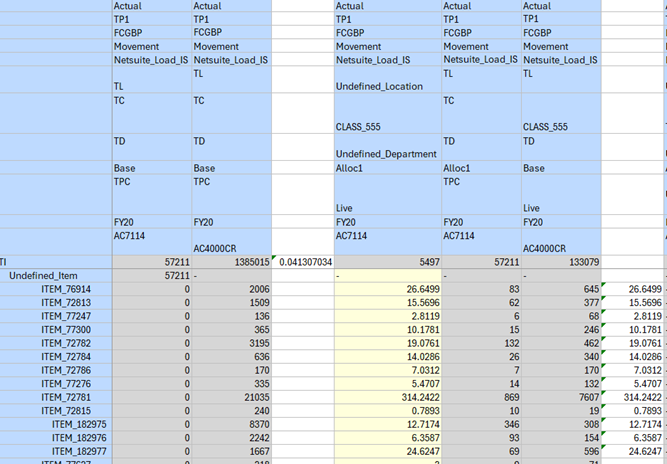
First Solution
So back to the question, how to get that number into the calculation without recalculating it all the time? First thought was to create a parking lot block with the number in, so that I can cross reference the data in the script without having to calculate it all the time. I added to the calculation the extra section to create the block for cross reference and changed the formula accordingly to point to the parking lot block.
SET HYBRIDBSOINCALCSCRIPT FULL;

FIX("Alloc1")
  CLEARBLOCK ALL;
ENDFIX

/* Create a parking lot block in a non aggretaing member "No_Item" so not to count add it into totals */

FIX("No_Item","Undefined_Location","Undefined_Channel","Undefined_Department","Undefined_Purchase_Class","FY20","Actual","Movement","Netsuite_Load_IS","FCGBP", @RELATIVE("YearTotal",0), "AC7114")
    "Alloc1" = "AC7114"->"TL"->"TC"->"TD"->"TPC"->"TI"->"Base" / "AC4000CR"->"TL"->"TC"->"TD"->"TPC"->"TI"->"Base";
ENDFIX

FIX("Undefined_Location","Undefined_Department", "FY20", "Actual", "Movement", "Netsuite_Load_IS", "FCGBP", @RELATIVE("TC",0), @RELATIVE("TPC",0))
  FIXPARALLEL(8,@REMOVE(@RELATIVE("TI",0),"Undefined_Item"))
    FIX("TP1","AC7114")
      "Alloc1"(
      "Alloc1" = "AC7114"->"No_Item"->"Undefined_Location"->"Undefined_Channel"->"Undefined_Department"->"Undefined_Purchase_Class" * "AC4000CR"->"Base"->"TL"->"TD";
      )
    ENDFIX
  ENDFIXPARALLEL
ENDFIX
This ran in 112 seconds, much better than 161, but I’m still left wondering how I can retrieve the number in Smart View in less than a second, I’m still of the view that this took far too long because the retrieve of the number in Smart View was less than a second and the hard coded calculation was less than a second.
Best Solution
Time for some Groovy. I reckoned I could use Groovy to get the numerator and denominator for the ratio and then stick the result into the calc script. Just like this.
/* RTPS: */
double cost
double revenue
double allocRatio

println new Date()

 Cube Inputcube = operation.application.getCube("Input")
 def builder = Inputcube.flexibleDataGridDefinitionBuilder()
 builder.setPovDimensions('Item', 'Location', 'Channel', 'Department', 'Purchase_Class', 'View', 'Year', 'Scenario', 'Balance_Type', 'Version', 'Currency')

 builder.setPov("TI", "TL","TC","TD","TPC","Base","FY20","Actual","Movement","Netsuite_Load_IS","FCGBP")

 builder.setColumnDimensions('Period')
 builder.addColumn('TP1')
 builder.setRowDimensions('Account')
 builder.addRow('AC4000CR','AC7114')
 Inputcube.loadGrid(builder.build(), false).withCloseable { grid ->
   grid.dataCellIterator().each {
     revenue = it.crossDimCell("AC4000CR").data
     cost = it.crossDimCell("AC7114").data
     }
   }

allocRatio = cost / revenue

println new Date()
println "Revenue: $revenue Cost: $cost"
println "Allocation Ratio: $allocRatio"

// Generate the Essbase Calculation Script with the ratio from Groovy

String calcScript = """
SET HYBRIDBSOINCALCSCRIPT FULL;

FIX("Alloc1")
  CLEARBLOCK ALL;
ENDFIX

FIX("Undefined_Location","Undefined_Department", "FY20", "Actual", "Movement", "Netsuite_Load_IS", "FCGBP", @RELATIVE("TC",0), @RELATIVE("TPC",0))
  FIXPARALLEL(8,@REMOVE(@RELATIVE("TI",0),"Undefined_Item"))
    FIX("TP1","AC7114")
      "Alloc1"(
      "Alloc1" = $allocRatio * "AC4000CR"->"Base"->"TL"->"TD";
      )
    ENDFIX
  ENDFIXPARALLEL
ENDFIX
"""

println("Calc Script Executed: \n $calcScript")

Inputcube.executeCalcScript(calcScript.toString())

println new Date()
The Groovy calculated the $allocRatio and passed that into the Essbase Calculation Script. Just as if it was the hard coded number 0.04132291. You can see the output in the Job console:
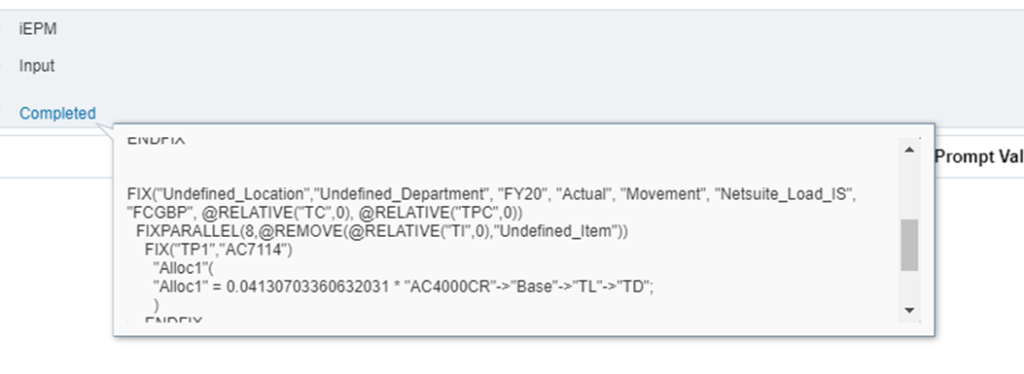
This ran in 1 second, and again I had to check the results in smart view, not really believing it has done anything. But the results were fine.
Groovy Only Solution
Having gone this far in Groovy, I wondered what a total Groovy calc would perform like:
/* RTPS: */

println new Date()

/****************************************************************************
Step 1: Retrieve the Revenue and Cost Values to calculate the ratio
****************************************************************************/

double cost
double revenue
double allocRatio
 Cube Inputcube = operation.application.getCube("Input")

 def builder = Inputcube.flexibleDataGridDefinitionBuilder()

 builder.setPovDimensions('Location', 'Channel', 'Department', 'Purchase_Class', 'View', 'Year', 'Scenario', 'Balance_Type', 'Version', 'Currency', 'Period')
 builder.setPov("TL","TC","TD","TPC","Base","FY20","Actual","Movement","Netsuite_Load_IS","FCGBP","TP1")
 builder.setColumnDimensions('Account')
 builder.addColumn('AC4000CR','AC7114')
 builder.setRowDimensions('Item')
 builder.addRow('TI')
 Inputcube.loadGrid(builder.build(), false).withCloseable { grid ->
   grid.dataCellIterator().each {
     revenue = it.crossDimCell("AC4000CR").data
     cost = it.crossDimCell("AC7114").data
     }
   }

  allocRatio = cost/revenue

  println "Revenue: $revenue Cost: $cost Ratio: $allocRatio"
  println new Date()

/****************************************************************************
Step 2: Retrieve the Revenue of every Item in a key value pair
****************************************************************************/

 def srcbuilder = Inputcube.flexibleDataGridDefinitionBuilder()

 srcbuilder.setPovDimensions('Location',  'Department', 'View', 'Year', 'Scenario', 'Balance_Type', 'Version', 'Currency', 'Period')
 srcbuilder.setPov("TL","TD","Base","FY20","Actual","Movement","Netsuite_Load_IS","FCGBP","TP1")

 srcbuilder.setColumnDimensions('Account')
 srcbuilder.addColumn('AC4000CR')
 srcbuilder.setRowDimensions('Item', 'Channel', 'Purchase_Class')
 srcbuilder.addRow('ILvl0Descendants(TI)', 'ILvl0Descendants(TC)', 'ILvl0Descendants(TPC)')

//set suppression settings
srcbuilder.setSuppressMissingRows(true)
srcbuilder.setSuppressMissingBlocks(true)
srcbuilder.setSuppressMissingSuppressesZero(true)

DataGridDefinition sourceGridDef = srcbuilder.build()
def targetRows = []
  Inputcube.loadGrid(sourceGridDef, false).withCloseable { sourceGrid ->
    sourceGrid.rows.each { row ->
/* set up an array to hold the data for the output grid */
    List<String> rowHeaders = row.headers.collect{it.mbrName}
    def rowData = []

/* if the value is #Missing, do nothing else calc the value */
    rowData = row.data.collect{it.missing ? '#Missing' : it.data * allocRatio}

    targetRows << [rowHeaders, rowData]
    }
}

println new Date()

/****************************************************************************
Step 3: Create the Output Grid
****************************************************************************/

DataGridBuilder tgtbuilder = Inputcube.dataGridBuilder("MM/DD/YYYY")
 tgtbuilder.addPov("Undefined_Department","Undefined_Location","Alloc1","FY20","Actual","Movement","Netsuite_Load_IS","FCGBP","TP1")

 tgtbuilder.addColumn('AC7114')
targetRows.each{  row ->
   List listRow = (List) row
            tgtbuilder.addRow((List< String>) listRow[0] , (List<>) listRow[1] )}

 DataGridBuilder.Status status = new DataGridBuilder.Status()

 tgtbuilder.build(status).withCloseable { grid ->
  println("Total number of cells accepted: $status.numAcceptedCells")
  println("Total number of cells rejected: $status.numRejectedCells")
  println("First 100 rejected cells: $status.cellsRejected")

    Inputcube.saveGrid(grid)

}

println new Date()
There are plenty of other blogs on the use of the flexibleDataGridDefinitionBuilder and dataGridBuilder and I’m not going to repeat here, however this script worked and ran in 3 seconds.
Bonus Solution
One last thought, can I run this script on my identical ASO cube. Just by changing this line
Cube Inputcube = operation.application.getCube(“Report”)
It ran with no problems, although it took 22 seconds.
And Finally
What I observe is:
- Calc Scripts are faster than Groovy
- Groovy is better to store static numbers than a block
- ARRAYS are useless in this context
- BSO Blocks calculate quicker than ASO
Therefore, I’d always try to pre-calculate static numbers in Groovy and use the BSO calculation engine where the use case allows. N.b. there may be a use case for ASO and it can be seen that the same allocation can run there too. But the use cases for choosing BSO vs Hybrid vs ASO is another subject altogether.