View Double Entry Transactions
Ever done an intercompany recharge of costs? The calculation creates the other side of the transaction and you want to see it, but the security set up prohibits you from viewing what you’ve just done. I was confronted with this paradox problem, I had a web form to input intracompany cross charges, but all I could see from the other side of the transaction was #NoAccess. In this example what I endeavour to do is not the transactions, but just to show data that may be in an inaccessible place.
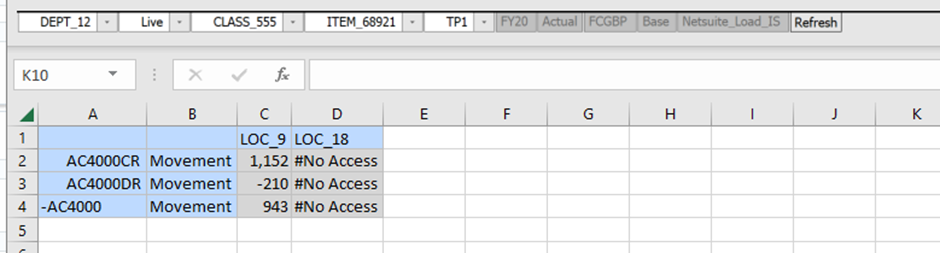
So, I thought that this is a job for Groovy, as I can access the Web Form grid object and put any value I like into the cell, superseding the #NoAccess. Therefore I thought, all I need to do is to use the flexibleDataGridDefinitionBuilder to create a grid to pull the data from Essbase.
Not as simple as that, my first attempt worked ok as Admin, but then as a user with restricted access to the cells, it failed because Groovy honours the privileges of the user executing the calculation script (n.b. Calculation Engine runs with admin privileges, I’ll use this later). So what I tried next was to run the script under a shell admin session using a connection (below).
def payload = """ {
                "jobType":"RULES", "jobName":"Security_Bypass"
                } """

HttpResponse<String> jsonResponse = operation.application
    .getConnection("Local_Instance")
    .post("/rest/v3/applications/iEPM/jobs")
    .header("Content-Type", "application/json")
    .body(payload).asString();

println jsonResponse.body.toString()
However, the problem with this was that although I got the data from the flex grid builder, I lost the context of the Web Form so that I couldn’t update the cells on the form.
Then I had a bright idea, as the Calculation Engine runs with Administrator Privileges even if a user invokes it, so could I get Groovy to do a data copy of the data that I couldn’t access to a place where I could access it. And that was the basic solution, but it still turned into a six step process:
- STEP 1. Get the POV, row & column members & data form the WEB form
- STEP2. Get the original value to replace after the copy n.b. in order to get the restricted value, it needs to use the Essbase Calc Engine and copy the data into an accessible area. Value needs to be restored afterwards.
- STEP3. Copy data in Essbase using traditional calc script.
- STEP4. Get the Copied Value from Essbase using flexibleDataGridDefinitionBuilder (and then Reinstate the original values in Essbase if there are no dynamic calc members on the form).
- STEP 5. Change the #NoAccess with the values from the Essbase flexibleDataGridDefinitionBuilder
- STEP 6. Reinstate the original values in Essbase. Can’t do it on the Fly in STEP 4 as dynamic calc members keep updating when copying back to each cell in turn.
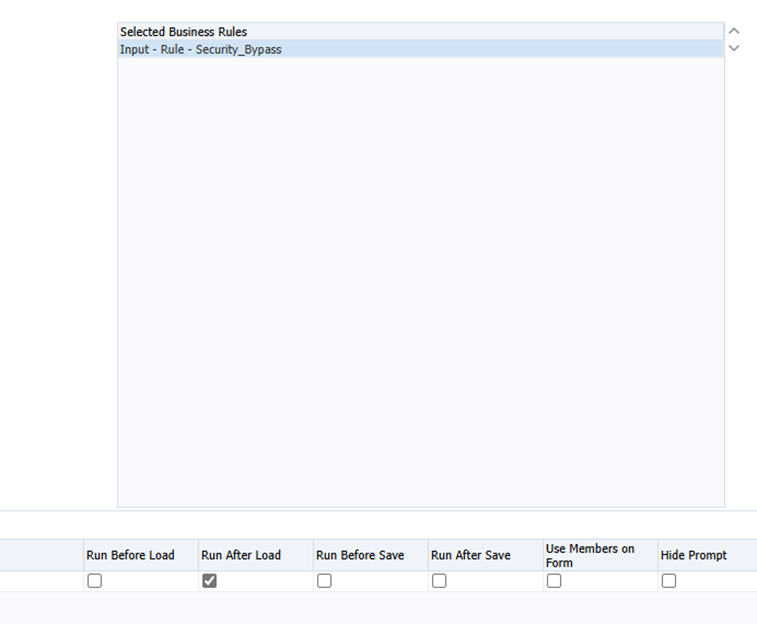
In the Web Form set the script to run after load:
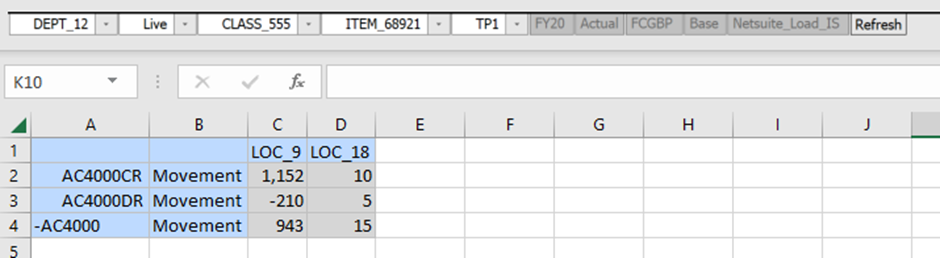
And here are the results:
Footnote:
In this example I copied the inaccessible data from LOC_18 to LOC_9, updated the grid and then put the original values back into LOC_9 in Essbase. In the event of the script crashing part way though would mean that you’d have to fix the data back somehow. A better solution would be to use a slice of the model that is unused to transport the data, begBalance could be an ideal candidate.
n.b. I have left some lines of hard coding in comments and println for reference when setting this up.
/****************************************************************************
Name: Security_Bypass
Desc: Present data on form where there is #NoAccess

Author: Nic Vos
Date: 2/06/25

Modifications:
Date:Who:What

****************************************************************************/
if (!operation.hasGrid()) {
 throwVetoException("This rule can only be run from a Web Form")
}

/*
Dimensions
Year,Scenario,Currency,View,Version,Department,Purchase_Class,Channel,Item,Period,Account,Balance_Type,Location
*/

String ToLocation = operation.application.getUserVariable("To_Location").Value.Name
String FromLocation = operation.application.getUserVariable("From_Location").Value.Name

def accountMbrs = ["AC4000CR", "AC4000DR", "AC4000"]
def balance_typeMbrs = ["Movement"]

List<DataGrid.HeaderCell> webGridpovmbrs=[]
List<List<DataGrid.HeaderCell>> webGridcolumnmbrs=[]
List<DataGrid.Row> webGridrowmbrs=[]

DataCell origCell
DataCell newCell
DataCell displayCell
double newVal
double origVal


/******************************************************************************
STEP 1.
get the POV, row & column members & data form the WEB form
******************************************************************************/
DataGrid webGrid = operation.grid

  webGridpovmbrs = webGrid.getPov()
  webGridcolumnmbrs = webGrid.getColumns()
  webGridrowmbrs = webGrid.getRows()

/* Interim information to the job console
String POVyear = webGridpovmbrs.find {it.dimName =='Year'}.essbaseMbrName
String POVScenario = webGridpovmbrs.find {it.dimName =='Scenario'}.essbaseMbrName
String POVVersion = webGridpovmbrs.find {it.dimName =='Version'}.essbaseMbrName

println "POVyear $POVyear"
println "POVScenario $POVScenario"
println "POVVersion $POVVersion"*/


/******************************************************************************
STEP2.
Get the original value to replace after the copy
n.b. in order to get the restricted value, it needs to use the Essbase Calc
Engine and copy the data into an accessible area. Value needs to be restored
afterwards .
******************************************************************************/
Cube EssbaseCube = operation.application.getCube("Input") //set #NoAccess cube

  for (rowmbr in webGridrowmbrs){ //MAIN LOOP

//SET THE OUTPUT ROW & HEADER n.b. the output is a single data column, so they are all really row members.
    List<String> outRows = rowmbr.headers.mbrName
    outRows.add('LOC_9')

    origCell = webGrid.getCellWithMembers(outRows[0].toString(),outRows[1].toString(),outRows[2].toString())
    origVal = origCell.data


/******************************************************************************
STEP3.
Copy data in Essbase using traditional calc script
******************************************************************************/

// Create a calc script to copy data from the restricted area to a POV where access is alowed. Calc Script Engine runs with administrator privildges.
    String calcScript = """
    Fix(${cscParams(webGridpovmbrs, outRows[0].toString(),outRows[1].toString())})
/*       DATACOPY LOC_18 to LOC_9;*/
       DATACOPY $FromLocation to $ToLocation;
    EndFix;"""
//    println("The following calc script was executed by $operation.user.fullName: \n $calcScript")
    EssbaseCube.executeCalcScript(calcScript.toString())

/******************************************************************************
STEP4.
Get the Copied Value from Essbase using flexibleDataGridDefinitionBuilder
and then Reinstate the original values in Essbase
******************************************************************************/

    def EssbaseGrid = EssbaseCube.flexibleDataGridDefinitionBuilder() //set source object inside the loop so that it clears it each itteration
//    EssbaseGrid.setPov("FY20","Actual","FCGBP","Base","Netsuite_Load_IS","DEPT_12","Live","CLASS_555","ITEM_68921","TP1")
//    EssbaseGrid.addColumn("LOC_9") //set column members
//    EssbaseGrid.addRow("Movement",'AC4000CR')
    EssbaseGrid.setPov(webGridpovmbrs)
    EssbaseGrid.addColumn(ToLocation) //set column members
    EssbaseGrid.addRow(rowmbr.headers.mbrName)


    EssbaseCube.loadGrid(EssbaseGrid.build(),false).withCloseable { grid ->
      newCell = grid.getCellWithMembers(outRows[0].toString(),outRows[1].toString(),outRows[2].toString())
	  newVal = newCell.data
      println newVal
//      newCell.data  = origVal //Can't do the reinstattement of the values here if there are dynamical calc members on the form. Do STEP 6.
      EssbaseCube.saveGrid(grid)
      }


// For Info: Print every property and corresponding property value
//Map<String, String> memberProps = outCell.getProperties() as Map<String, String>
//for ( e in memberProps ) {
//  println e
//}


/******************************************************************************
STEP 5.
change the #NoAccess with the values from the Essbase flexibleDataGridDefinitionBuilder
******************************************************************************/
//DataCell cell = webGrid.getCellWithMembers('AC4000DR', 'Movement','LOC_18')
    outRows[2] = ('LOC_18')
    displayCell = webGrid.getCellWithMembers(outRows[0].toString(),outRows[1].toString(),outRows[2].toString())
          displayCell.setForceEditable(true)
	      displayCell.data = newVal
          displayCell.setForceEditable(false)
} //END OF MAIN LOOP

/******************************************************************************
STEP 6.

Reinstate the original values in Essbase. Can't do it on the Fly as
dynamic calc members keep updating when copying back to each cell in turn.
******************************************************************************/

  for (rowmbr in webGridrowmbrs){ //MAIN LOOP

//SET THE OUTPUT ROW & HEADER n.b. the output is a single data column, so they are all really row members.
    List<String> outRows = rowmbr.headers.mbrName
    outRows.add('LOC_9')

    origCell = webGrid.getCellWithMembers(outRows[0].toString(),outRows[1].toString(),outRows[2].toString())
    origVal = origCell.data

    def EssbaseGrid = EssbaseCube.flexibleDataGridDefinitionBuilder() //set source object inside the loop so that it clears it each itteration
//    EssbaseGrid.setPov("FY20","Actual","FCGBP","Base","Netsuite_Load_IS","DEPT_12","Live","CLASS_555","ITEM_68921","TP1")
//    EssbaseGrid.addColumn("LOC_9") //set column members
//    EssbaseGrid.addRow("Movement",'AC4000CR')
    EssbaseGrid.setPov(webGridpovmbrs)
    EssbaseGrid.addColumn(ToLocation) //set column members
    EssbaseGrid.addRow(rowmbr.headers.mbrName)

    EssbaseCube.loadGrid(EssbaseGrid.build(),false).withCloseable { grid ->
      newCell = grid.getCellWithMembers(outRows[0].toString(),outRows[1].toString(),outRows[2].toString())
      newCell.data  = origVal
      EssbaseCube.saveGrid(grid)
      }


} //END OF REINSTATE LOOP